The Tech Edvocate

Top Menu

  • Advertisement
  • Apps
  • Home Page
  • Home Page Five (No Sidebar)
  • Home Page Four
  • Home Page Three
  • Home Page Two
  • Home Tech2
  • Icons [No Sidebar]
  • Left Sidbear Page
  • Lynch Educational Consulting
  • My Account
  • My Speaking Page
  • Newsletter Sign Up Confirmation
  • Newsletter Unsubscription
  • Our Brands
  • Page Example
  • Privacy Policy
  • Protected Content
  • Register
  • Request a Product Review
  • Shop
  • Shortcodes Examples
  • Signup
  • Start Here
    • Governance
    • Careers
    • Contact Us
  • Terms and Conditions
  • The Edvocate
  • The Tech Edvocate Product Guide
  • Topics
  • Write For Us
  • Advertise

Main Menu

  • Start Here
    • Our Brands
    • Governance
      • Lynch Educational Consulting, LLC.
      • Dr. Lynch’s Personal Website
      • Careers
    • Write For Us
    • The Tech Edvocate Product Guide
    • Contact Us
    • Books
    • Edupedia
    • Post a Job
    • The Edvocate Podcast
    • Terms and Conditions
    • Privacy Policy
  • Topics
    • Assistive Technology
    • Child Development Tech
    • Early Childhood & K-12 EdTech
    • EdTech Futures
    • EdTech News
    • EdTech Policy & Reform
    • EdTech Startups & Businesses
    • Higher Education EdTech
    • Online Learning & eLearning
    • Parent & Family Tech
    • Personalized Learning
    • Product Reviews
  • Advertise
  • Tech Edvocate Awards
  • The Edvocate
  • Pedagogue
  • School Ratings

logo

The Tech Edvocate

  • Start Here
    • Our Brands
    • Governance
      • Lynch Educational Consulting, LLC.
      • Dr. Lynch’s Personal Website
        • My Speaking Page
      • Careers
    • Write For Us
    • The Tech Edvocate Product Guide
    • Contact Us
    • Books
    • Edupedia
    • Post a Job
    • The Edvocate Podcast
    • Terms and Conditions
    • Privacy Policy
  • Topics
    • Assistive Technology
    • Child Development Tech
    • Early Childhood & K-12 EdTech
    • EdTech Futures
    • EdTech News
    • EdTech Policy & Reform
    • EdTech Startups & Businesses
    • Higher Education EdTech
    • Online Learning & eLearning
    • Parent & Family Tech
    • Personalized Learning
    • Product Reviews
  • Advertise
  • Tech Edvocate Awards
  • The Edvocate
  • Pedagogue
  • School Ratings
  • A Visitors Guide to Long Beach (CA), United States

  • A Visitor’s Guide to Fresno (CA), United States

  • A Visitors Guide to New Orleans (LA), United States

  • A Visitors Guide to Sacramento (CA), United States

  • A Visitors Guide to Lyon, France

  • JisuLife Ultra2 Portable Fan: A Powerful Multi-Function Cooling Solution

  • A Visitors Guide to Viña del Mar, Chile

  • A Visitors Guide to Århus, Denmark

  • A Visitors Guide to Bakersfield (CA), United States

  • A Visitors Guide to Aurora (CO), United States

Tech Advice
Home›Tech Advice›Here’s how everyone’s taking those gorgeous close-up shots with their iPhone

Here’s how everyone’s taking those gorgeous close-up shots with their iPhone
By Matthew Lynch
July 17, 2023
0
Spread the love

Intro:

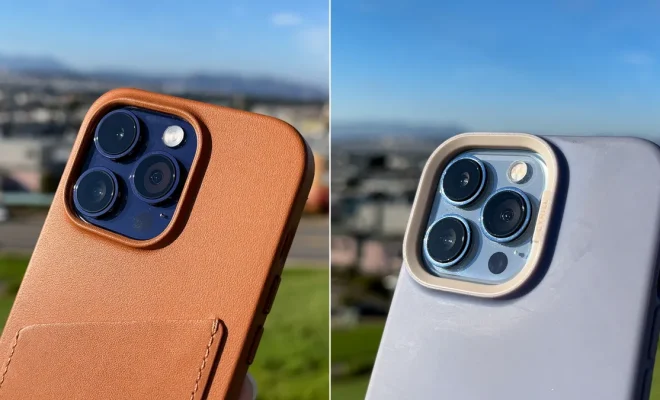
In the world of photography, capturing a stunning close-up can be quite challenging. However, with the ever-advancing capabilities of iPhone cameras, you too can create astonishing close-up shots with ease. In this article, we will outline the key techniques and tips that have enabled iPhone users worldwide to take breathtaking close-ups just like the pros.

1. Enable Portrait Mode:

Portrait mode on your iPhone creates a depth-of-field effect, allowing you to take professional-looking close-up shots by blurring the background and focusing on your subject. This feature elegantly captures even minute details such as individual hair strands or tiny patterns on objects.
To enable portrait mode on your iPhone, simply swipe left on the camera app and select “portrait” from the options below.

2. Get Close:

Don’t be afraid to bring your iPhone closer to your subject. The closer you are, the more details will be visible in the shot. However, make sure not to get too close as it could cause your subject to go out of focus.

3. Focus and Exposure:

Before you snap a photo, tap your iPhone screen where you want the focus to be set, keeping your primary subject sharp and clear. You can also adjust exposure by swiping up or down on the screen – this helps brighten or darken the image for an optimal look.

4. Use an External Lens (Optional):

Although optional, investing in an external lens can greatly enhance your close-up photography game using your iPhone. Macro lenses, for example, are tailored specifically for close-up shots allowing users to reveal intricate details that might not have been otherwise possible.

5. Make Use of Burst Mode:

Having trouble capturing clear photos due to shaky hands or fast-moving subjects? Activate burst mode by holding down the shutter button – this results in multiple rapid shots taken at different focus points, increasing the chances of obtaining a stunning image.

6. Edit Your Photos:

Once you’ve taken your close-up shots, use the built-in editing tools on your iPhone to enhance your images further. Play with settings like brightness, contrast, highlights, and shadows to fine-tune your close-ups and make them truly captivating.

Conclusion:

Taking professional-looking close-up shots with your iPhone is now easier than ever with these techniques. By simply tweaking a few settings and adopting these tips, you’ll soon find yourself taking mind-blowing close-ups that invoke admiration from your friends and followers alike. So take out your iPhone, embrace your inner photographer, and start capturing the world’s beauty from up close!


Previous Article

How to Stop Those Annoying Spam Calls ...

Next Article

How to know exactly where your spouse ...

Matthew Lynch

Related articles More from author

  • Tech Advice

    How Much Do Real Estate Investors Really Make?

    September 6, 2023
    By Matthew Lynch
  • Tech Advice

    What’s a NormaTec? The compression therapy elite athletes love

    July 6, 2023
    By Matthew Lynch
  • Tech Advice

    2024 Volvo S60 B5 Plus Dark Theme 4dr Front-Wheel Drive Sedan : Trim Details, Reviews, Prices, Specs, and Incentives

    August 21, 2023
    By Matthew Lynch
  • Tech Advice

    Fujifilm Instax Mini 12 Review

    July 20, 2023
    By Matthew Lynch
  • Tech Advice

    Nintendo Switch – OLED Model Review

    July 20, 2023
    By Matthew Lynch
  • Tech Advice

    Give Your Loved One the Gift of Youthful, Radiant Skin this Christmas

    November 20, 2025
    By Matthew Lynch

Search

Login & Registration

  • Register
  • Log in
  • Entries feed
  • Comments feed
  • WordPress.org

Newsletter

Signup for The Tech Edvocate Newsletter and have the latest in EdTech news and opinion delivered to your email address!

About Us

Since technology is not going anywhere and does more good than harm, adapting is the best course of action. That is where The Tech Edvocate comes in. We plan to cover the PreK-12 and Higher Education EdTech sectors and provide our readers with the latest news and opinion on the subject. From time to time, I will invite other voices to weigh in on important issues in EdTech. We hope to provide a well-rounded, multi-faceted look at the past, present, the future of EdTech in the US and internationally.

We started this journey back in June 2016, and we plan to continue it for many more years to come. I hope that you will join us in this discussion of the past, present and future of EdTech and lend your own insight to the issues that are discussed.

Newsletter

Signup for The Tech Edvocate Newsletter and have the latest in EdTech news and opinion delivered to your email address!

Contact Us

The Tech Edvocate
910 Goddin Street
Richmond, VA 23231
(601) 630-5238
[email protected]

Copyright © 2025 Matthew Lynch. All rights reserved.