The Tech Edvocate

Top Menu

  • Advertisement
  • Apps
  • Home Page
  • Home Page Five (No Sidebar)
  • Home Page Four
  • Home Page Three
  • Home Page Two
  • Home Tech2
  • Icons [No Sidebar]
  • Left Sidbear Page
  • Lynch Educational Consulting
  • My Account
  • My Speaking Page
  • Newsletter Sign Up Confirmation
  • Newsletter Unsubscription
  • Our Brands
  • Page Example
  • Privacy Policy
  • Protected Content
  • Register
  • Request a Product Review
  • Shop
  • Shortcodes Examples
  • Signup
  • Start Here
    • Governance
    • Careers
    • Contact Us
  • Terms and Conditions
  • The Edvocate
  • The Tech Edvocate Product Guide
  • Topics
  • Write For Us
  • Advertise

Main Menu

  • Start Here
    • Our Brands
    • Governance
      • Lynch Educational Consulting, LLC.
      • Dr. Lynch’s Personal Website
      • Careers
    • Write For Us
    • The Tech Edvocate Product Guide
    • Contact Us
    • Books
    • Edupedia
    • Post a Job
    • The Edvocate Podcast
    • Terms and Conditions
    • Privacy Policy
  • Topics
    • Assistive Technology
    • Child Development Tech
    • Early Childhood & K-12 EdTech
    • EdTech Futures
    • EdTech News
    • EdTech Policy & Reform
    • EdTech Startups & Businesses
    • Higher Education EdTech
    • Online Learning & eLearning
    • Parent & Family Tech
    • Personalized Learning
    • Product Reviews
  • Advertise
  • Tech Edvocate Awards
  • The Edvocate
  • Pedagogue
  • School Ratings

logo

The Tech Edvocate

  • Start Here
    • Our Brands
    • Governance
      • Lynch Educational Consulting, LLC.
      • Dr. Lynch’s Personal Website
        • My Speaking Page
      • Careers
    • Write For Us
    • The Tech Edvocate Product Guide
    • Contact Us
    • Books
    • Edupedia
    • Post a Job
    • The Edvocate Podcast
    • Terms and Conditions
    • Privacy Policy
  • Topics
    • Assistive Technology
    • Child Development Tech
    • Early Childhood & K-12 EdTech
    • EdTech Futures
    • EdTech News
    • EdTech Policy & Reform
    • EdTech Startups & Businesses
    • Higher Education EdTech
    • Online Learning & eLearning
    • Parent & Family Tech
    • Personalized Learning
    • Product Reviews
  • Advertise
  • Tech Edvocate Awards
  • The Edvocate
  • Pedagogue
  • School Ratings
  • A Visitors Guide to Pittsburgh (PA), United States

  • A Visitors Guide to Colorado Springs (CO), United States

  • 5 Pairs of Shoes That Will Instantly Step Your Shoe Game Up

  • Radiant Youthful Skin is the Perfect Christmas Gift

  • Give Your Loved One the Gift of Youthful, Radiant Skin this Christmas

  • Give Your Loved One the Gift of a Restful Night Sleep this Christmas

  • Nex Playground’s Holiday Sales Bring Active Play Indoors This Seaso

  • A Visitors Guide to Louisville (KY), United States

  • A Visitor’s Guide to Nashville-Davidson (TN), United States

  • A Visitors Guide to Portland (OR), United States

Assistive Technology
Home›Assistive Technology›Best Ways to Use Your Roku TV Remote

Best Ways to Use Your Roku TV Remote
By Matthew Lynch
June 11, 2023
0
Spread the love

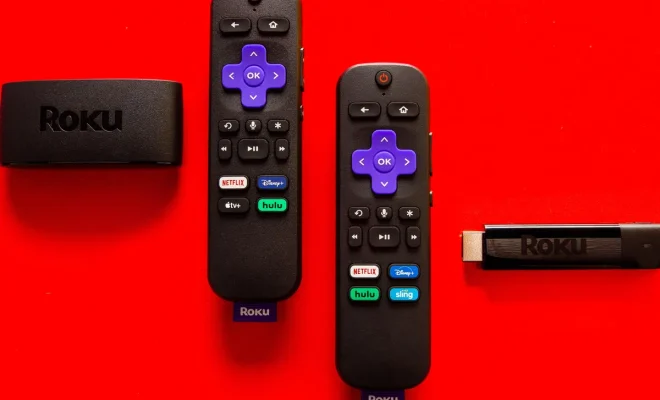
As more people are ditching traditional cable TV for subscription-based streaming services, Roku TV has become increasingly popular. With a Roku TV, you have access to a vast range of streaming services such as Netflix, Hulu, YouTube, Amazon Prime Video, and Apple TV. To navigate these streaming services, you need a Roku TV remote. Though the remote may seem simple, it has various features that can enhance your streaming experience. Here are the best ways to use your Roku TV remote.

  1. Voice Search

If you’re tired of typing out long titles or names, then voice search is an excellent feature for you. You can activate voice search by pressing the microphone button on the remote and speaking into it. It eliminates the need for clicking and typing, and you can find your favorite shows or movies easily.

  1. Private Listening

Sometimes, you may want to watch your favorite shows without disturbing others in the same room. Roku TV’s private listening feature allows you to watch TV with headphones. You can plug in your headphones to the remote’s headphone jack and enjoy your shows privately.

  1. Shortcut Buttons

Your remote’s shortcut buttons are customizable and can make your streaming experience quicker and easier. The remote comes with four buttons labeled A, B, C, and D. You can assign these buttons to your most-used streaming services. Instead of scrolling through the Roku menu to find your preferred streaming service, you can just press the assigned button.

  1. Play/Pause

The Play/Pause button is pretty self-explanatory, but it’s worth mentioning. This allows you to pause or resume playing your movie at any time. You can also use this button to stop your video and go back to the main menu.

  1. Screen Mirroring

With Roku TV’s screen mirroring feature, you can watch your phone’s content on your TV screen. From videos, photos, music, or games, you can use your phone to control your streaming experience. You can enable screen mirroring by navigating to the settings menu on your Roku TV.

  1. Volume and Power

Your Roku TV remote can be used to control the TV’s volume and power. It eliminates the need for having multiple remotes on your coffee table. You can effortlessly turn on your TV, adjust the volume, and switch between streaming services with one remote.

In conclusion, the Roku TV remote is an essential tool that can help streamline your streaming experience. With its useful features, it can enhance your search, playback, and control of your Roku TV. Try these features and see how they can make your TV viewing more enjoyable.


Previous Article

How to Change Brightness in Windows 11

Next Article

Do You Need the Find My iPhone ...

Matthew Lynch

Related articles More from author

  • Assistive Technology

    How to Reset AirPods

    June 15, 2023
    By Matthew Lynch
  • Assistive Technology

    How to Track Your Child’s Phone and Keep Them Safe

    June 9, 2023
    By Matthew Lynch
  • Assistive Technology

    A User-Friendly Guide to Making Phone Calls in Gmail

    June 10, 2023
    By Matthew Lynch
  • Assistive Technology

    How Long Does a Tesla Take to Charge & How Much Does It Cost?

    June 5, 2023
    By Matthew Lynch
  • Assistive Technology

    How to Encrypt a Password in Python Using bcrypt

    June 23, 2023
    By Matthew Lynch
  • Assistive Technology

    Using the Mac Security Preference Pane

    June 22, 2023
    By Matthew Lynch

Search

Login & Registration

  • Register
  • Log in
  • Entries feed
  • Comments feed
  • WordPress.org

Newsletter

Signup for The Tech Edvocate Newsletter and have the latest in EdTech news and opinion delivered to your email address!

About Us

Since technology is not going anywhere and does more good than harm, adapting is the best course of action. That is where The Tech Edvocate comes in. We plan to cover the PreK-12 and Higher Education EdTech sectors and provide our readers with the latest news and opinion on the subject. From time to time, I will invite other voices to weigh in on important issues in EdTech. We hope to provide a well-rounded, multi-faceted look at the past, present, the future of EdTech in the US and internationally.

We started this journey back in June 2016, and we plan to continue it for many more years to come. I hope that you will join us in this discussion of the past, present and future of EdTech and lend your own insight to the issues that are discussed.

Newsletter

Signup for The Tech Edvocate Newsletter and have the latest in EdTech news and opinion delivered to your email address!

Contact Us

The Tech Edvocate
910 Goddin Street
Richmond, VA 23231
(601) 630-5238
[email protected]

Copyright © 2025 Matthew Lynch. All rights reserved.