The Tech Edvocate

Top Menu

  • Advertisement
  • Apps
  • Home Page
  • Home Page Five (No Sidebar)
  • Home Page Four
  • Home Page Three
  • Home Page Two
  • Home Tech2
  • Icons [No Sidebar]
  • Left Sidbear Page
  • Lynch Educational Consulting
  • My Account
  • My Speaking Page
  • Newsletter Sign Up Confirmation
  • Newsletter Unsubscription
  • Our Brands
  • Page Example
  • Privacy Policy
  • Protected Content
  • Register
  • Request a Product Review
  • Shop
  • Shortcodes Examples
  • Signup
  • Start Here
    • Governance
    • Careers
    • Contact Us
  • Terms and Conditions
  • The Edvocate
  • The Tech Edvocate Product Guide
  • Topics
  • Write For Us
  • Advertise

Main Menu

  • Start Here
    • Our Brands
    • Governance
      • Lynch Educational Consulting, LLC.
      • Dr. Lynch’s Personal Website
      • Careers
    • Write For Us
    • The Tech Edvocate Product Guide
    • Contact Us
    • Books
    • Edupedia
    • Post a Job
    • The Edvocate Podcast
    • Terms and Conditions
    • Privacy Policy
  • Topics
    • Assistive Technology
    • Child Development Tech
    • Early Childhood & K-12 EdTech
    • EdTech Futures
    • EdTech News
    • EdTech Policy & Reform
    • EdTech Startups & Businesses
    • Higher Education EdTech
    • Online Learning & eLearning
    • Parent & Family Tech
    • Personalized Learning
    • Product Reviews
  • Advertise
  • Tech Edvocate Awards
  • The Edvocate
  • Pedagogue
  • School Ratings

logo

The Tech Edvocate

  • Start Here
    • Our Brands
    • Governance
      • Lynch Educational Consulting, LLC.
      • Dr. Lynch’s Personal Website
        • My Speaking Page
      • Careers
    • Write For Us
    • The Tech Edvocate Product Guide
    • Contact Us
    • Books
    • Edupedia
    • Post a Job
    • The Edvocate Podcast
    • Terms and Conditions
    • Privacy Policy
  • Topics
    • Assistive Technology
    • Child Development Tech
    • Early Childhood & K-12 EdTech
    • EdTech Futures
    • EdTech News
    • EdTech Policy & Reform
    • EdTech Startups & Businesses
    • Higher Education EdTech
    • Online Learning & eLearning
    • Parent & Family Tech
    • Personalized Learning
    • Product Reviews
  • Advertise
  • Tech Edvocate Awards
  • The Edvocate
  • Pedagogue
  • School Ratings
  • A Visitors Guide to Viña del Mar, Chile

  • A Visitors Guide to Århus, Denmark

  • A Visitors Guide to Bakersfield (CA), United States

  • A Visitors Guide to Aurora (CO), United States

  • A Visitor’s Guide to Toledo (OH), United States

  • A Visitors Guide to Cincinnati (OH), United States

  • The MagicEagle Cam 5: Revolutionizing Wildlife Monitoring with Smart 4G Technology

  • A Visitors Guide to Pittsburgh (PA), United States

  • A Visitors Guide to Colorado Springs (CO), United States

  • 5 Pairs of Shoes That Will Instantly Step Your Shoe Game Up

Tech Advice
Home›Tech Advice›Apple Music Sing: How to Use Karaoke Mode on iPhone and iPad

Apple Music Sing: How to Use Karaoke Mode on iPhone and iPad
By Matthew Lynch
July 15, 2023
0
Spread the love

Apple Music Sing has introduced a fun and interactive way to enjoy your favorite songs on your iPhone and iPad. With its Karaoke mode, you can now sing along to your favorite tunes, improve your singing skills, or have a blast with friends and family. In this article, we will guide you through the process of setting up and using the Karaoke mode in Apple Music on your iPhone and iPad.

Step 1: Update Your Device

Before using the Karaoke mode, make sure that your iPhone or iPad is running the latest software update. Go to Settings > General > Software Update to check for any updates available.

Step 2: Launch Apple Music

Open the Apple Music app on your device. If you haven’t already, sign in with your Apple ID or create a new account to access the extensive library of songs.

Step 3: Explore the Lyrics Feature

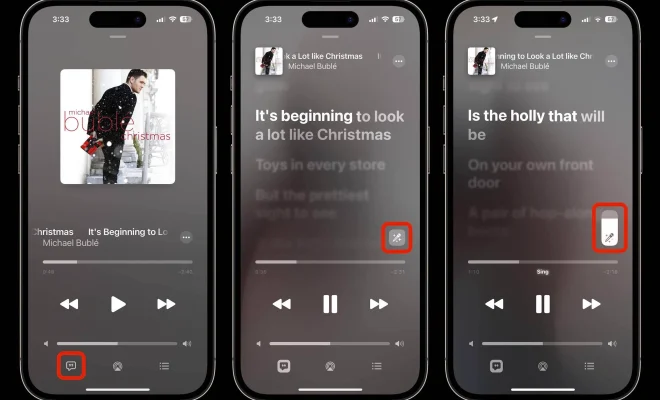
While playing any song from Apple Music, tap on the “Lyrics” button below the playback controls. The Lyrics button looks like a speech bubble with quotation marks inside. This will show you the lyrics of the song and highlight them in real-time as they are sung.

Step 4: Engage Karaoke Mode

To engage Karaoke mode, tap on the Microphone icon that appears next to the Lyrics button when you press it. The music’s vocal track volume will be reduced automatically, allowing your voice to take center stage as you sing along.

Step 5: Connect External Devices (Optional)

For an even better Karaoke experience, consider connecting your iPhone or iPad to external speakers or even a TV. Use AirPlay or an HDMI cable for seamless audio and video output.

Step 6: Customize Your Experience (Optional)

Customize your karaoke experience by adjusting the vocal track volume using the on-screen slider. You can also change the font size of the lyrics by going to Settings > Music > Lyrics & Captions.

Step 7: Sing Your Heart Out

Now that you’ve set up your Karaoke mode, it’s time to sing along to your favorite tunes. Browse through the extensive library or search for specific songs to sing. The highlighted lyrics will guide you throughout the song, making it easy to follow along.

Conclusion

With Apple Music Sing and its easy-to-use Karaoke mode, enjoying your favorite tracks has become even more entertaining. Whether you’re looking to improve your singing skills, have fun with friends during a party, or unwind after a long day, this feature will turn your iPhone or iPad into a portable Karaoke machine. So grab your device and belt out those tunes!


Previous Article

Two ‘Uncharted’ Games Coming to PC for ...

Next Article

Apple Music vs. Spotify: Comparing the top ...

Matthew Lynch

Related articles More from author

  • Tech Advice

    How Much Does Window Replacement Cost? Average Prices Of Every Window Type and Size

    August 8, 2023
    By Matthew Lynch
  • Tech Advice

    Moto G Fast vs. Moto E: Here’s which sub-$200 Motorola phone to buy

    July 17, 2023
    By Matthew Lynch
  • Tech Advice

    Best Portable Mini Bluetooth Speakers for 2023: Top Compact Waterproof Wireless Speakers

    July 16, 2023
    By Matthew Lynch
  • Tech Advice

    Why Are Interest Rates So Low on Savings Accounts?

    September 7, 2023
    By Matthew Lynch
  • Tech Advice

    AOC unloads on Biden’s critics in late-night Instagram Live

    July 19, 2024
    By Matthew Lynch
  • Tech Advice

    2024 BMW 330e Base 4dr Rear-Wheel Drive Sedan : Trim Details, Reviews, Prices, Specs, and Incentives

    August 21, 2023
    By Matthew Lynch

Search

Login & Registration

  • Register
  • Log in
  • Entries feed
  • Comments feed
  • WordPress.org

Newsletter

Signup for The Tech Edvocate Newsletter and have the latest in EdTech news and opinion delivered to your email address!

About Us

Since technology is not going anywhere and does more good than harm, adapting is the best course of action. That is where The Tech Edvocate comes in. We plan to cover the PreK-12 and Higher Education EdTech sectors and provide our readers with the latest news and opinion on the subject. From time to time, I will invite other voices to weigh in on important issues in EdTech. We hope to provide a well-rounded, multi-faceted look at the past, present, the future of EdTech in the US and internationally.

We started this journey back in June 2016, and we plan to continue it for many more years to come. I hope that you will join us in this discussion of the past, present and future of EdTech and lend your own insight to the issues that are discussed.

Newsletter

Signup for The Tech Edvocate Newsletter and have the latest in EdTech news and opinion delivered to your email address!

Contact Us

The Tech Edvocate
910 Goddin Street
Richmond, VA 23231
(601) 630-5238
[email protected]

Copyright © 2025 Matthew Lynch. All rights reserved.