The Tech Edvocate

Top Menu

  • Advertisement
  • Apps
  • Home Page
  • Home Page Five (No Sidebar)
  • Home Page Four
  • Home Page Three
  • Home Page Two
  • Home Tech2
  • Icons [No Sidebar]
  • Left Sidbear Page
  • Lynch Educational Consulting
  • My Account
  • My Speaking Page
  • Newsletter Sign Up Confirmation
  • Newsletter Unsubscription
  • Our Brands
  • Page Example
  • Privacy Policy
  • Protected Content
  • Register
  • Request a Product Review
  • Shop
  • Shortcodes Examples
  • Signup
  • Start Here
    • Governance
    • Careers
    • Contact Us
  • Terms and Conditions
  • The Edvocate
  • The Tech Edvocate Product Guide
  • Topics
  • Write For Us
  • Advertise

Main Menu

  • Start Here
    • Our Brands
    • Governance
      • Lynch Educational Consulting, LLC.
      • Dr. Lynch’s Personal Website
      • Careers
    • Write For Us
    • The Tech Edvocate Product Guide
    • Contact Us
    • Books
    • Edupedia
    • Post a Job
    • The Edvocate Podcast
    • Terms and Conditions
    • Privacy Policy
  • Topics
    • Assistive Technology
    • Child Development Tech
    • Early Childhood & K-12 EdTech
    • EdTech Futures
    • EdTech News
    • EdTech Policy & Reform
    • EdTech Startups & Businesses
    • Higher Education EdTech
    • Online Learning & eLearning
    • Parent & Family Tech
    • Personalized Learning
    • Product Reviews
  • Advertise
  • Tech Edvocate Awards
  • The Edvocate
  • Pedagogue
  • School Ratings

logo

The Tech Edvocate

  • Start Here
    • Our Brands
    • Governance
      • Lynch Educational Consulting, LLC.
      • Dr. Lynch’s Personal Website
        • My Speaking Page
      • Careers
    • Write For Us
    • The Tech Edvocate Product Guide
    • Contact Us
    • Books
    • Edupedia
    • Post a Job
    • The Edvocate Podcast
    • Terms and Conditions
    • Privacy Policy
  • Topics
    • Assistive Technology
    • Child Development Tech
    • Early Childhood & K-12 EdTech
    • EdTech Futures
    • EdTech News
    • EdTech Policy & Reform
    • EdTech Startups & Businesses
    • Higher Education EdTech
    • Online Learning & eLearning
    • Parent & Family Tech
    • Personalized Learning
    • Product Reviews
  • Advertise
  • Tech Edvocate Awards
  • The Edvocate
  • Pedagogue
  • School Ratings
  • 100 Best Apps for Creative Thinking

  • 100 Best Apps for Ideation

  • 100 Best Apps for Brainstorming

  • 100 Best Apps for Active Recall

  • 100 Best Apps for Spaced Repetition

  • 100 Best Apps for Building a Second Brain

  • 100 Best Apps for Second Brain

  • A Casino Bonus Is Not Its Cash Value: How to Read Reviews Clearly

  • 100 Best Apps for Zettelkasten

  • 100 Best Apps for Bullet Journaling

Digital & Mobile Technology
Home›Digital & Mobile Technology›What Are Prefetch Files in Windows? Are They Important?

What Are Prefetch Files in Windows? Are They Important?
By Matthew Lynch
June 15, 2023
0
Spread the love

If you use a Windows computer, you may have come across the term “prefetch files” and wondered what they are and if they’re important. In simple terms, prefetch files are system files that help Windows load frequently-used programs faster. In this article, we’ll dive deeper into what prefetch files are, how they work, and their importance in the overall performance of your computer.

What Are Prefetch Files?

Prefetch files are a feature of Windows that was first introduced in Windows XP. They are files that store information about the applications and files that are frequently accessed by your computer. When you launch a program or application, Windows uses this information to pre-fetch some of the data and resources that the program will need to run. Pre-fetching these resources can significantly reduce the time it takes to launch the program and make it more responsive.

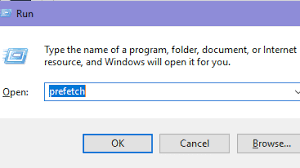
Prefetch files are stored in the Windows\Prefetch folder. The folder contains files with the .pf extension, and each file corresponds to a specific program or application that has been launched on your computer. Over time, as you use different programs and applications, the prefetch folder will grow in size.

How Do Prefetch Files Work?

When you launch an application for the first time, Windows creates a prefetch file for that application. This file stores information about the resources that the application needs to run. The next time you launch the same application, Windows will use the information in the prefetch file to pre-fetch some of those resources before the application is launched. This way, the application can start up faster.

It’s important to note that prefetch files are not the same as cache files. Cache files are temporary files that an application creates to store data temporarily. These files are stored in a different location and are not used by Windows to pre-fetch data.

Are Prefetch Files Important?

Yes, prefetch files are important to the performance of your computer. By pre-fetching the resources that an application needs, Windows can start the application faster, making it more responsive. This can be especially beneficial if you use certain applications frequently.

However, as the prefetch folder grows in size, it can also slow down the performance of your computer. This is because Windows has to search through all the prefetch files to find the ones that it needs. If there are too many prefetch files, the search can take longer, and it can slow down the overall performance of your computer.

To ensure that your computer stays performant, it’s recommended that you periodically clean out the prefetch folder. You can do this manually by going to the Windows\Prefetch folder and deleting the .pf files that you don’t need. Alternatively, you can use a utility like CCleaner to clean out the prefetch folder automatically.


Previous Article

Quotation Marks on Search Engines: How to ...

Next Article

How to Go to Any Date Quickly ...

Matthew Lynch

Related articles More from author

  • Digital & Mobile Technology

    Best Free Language Learning Websites of 2023

    June 7, 2023
    By Matthew Lynch
  • Digital & Mobile Technology

    Old vs. New Apple TV 4K: Is It Worth the Upgrade?

    August 1, 2023
    By Matthew Lynch
  • Digital & Mobile Technology

    Best Online Translators You Can Use in the Real World

    August 3, 2023
    By Matthew Lynch
  • Digital & Mobile Technology

    What Is a DRF File?

    July 6, 2023
    By Matthew Lynch
  • Digital & Mobile Technology

    How to Hook Up Cable TV

    April 26, 2023
    By Matthew Lynch
  • Digital & Mobile Technology

    Owncloud vs. NextCloud vs. Seafile: Which Self-Hosted Cloud Storage Should You Choose?

    July 31, 2023
    By Matthew Lynch

Search

Login & Registration

  • Log in
  • Entries feed
  • Comments feed
  • WordPress.org

Newsletter

Signup for The Tech Edvocate Newsletter and have the latest in EdTech news and opinion delivered to your email address!

About Us

Since technology is not going anywhere and does more good than harm, adapting is the best course of action. That is where The Tech Edvocate comes in. We plan to cover the PreK-12 and Higher Education EdTech sectors and provide our readers with the latest news and opinion on the subject. From time to time, I will invite other voices to weigh in on important issues in EdTech. We hope to provide a well-rounded, multi-faceted look at the past, present, the future of EdTech in the US and internationally.

We started this journey back in June 2016, and we plan to continue it for many more years to come. I hope that you will join us in this discussion of the past, present and future of EdTech and lend your own insight to the issues that are discussed.

Newsletter

Signup for The Tech Edvocate Newsletter and have the latest in EdTech news and opinion delivered to your email address!

Contact Us

The Tech Edvocate
910 Goddin Street
Richmond, VA 23231
(601) 630-5238
[email protected]

Copyright © 2026 Matthew Lynch. All rights reserved.