The Tech Edvocate

Top Menu

  • Advertisement
  • Apps
  • Home Page
  • Home Page Five (No Sidebar)
  • Home Page Four
  • Home Page Three
  • Home Page Two
  • Home Tech2
  • Icons [No Sidebar]
  • Left Sidbear Page
  • Lynch Educational Consulting
  • My Account
  • My Speaking Page
  • Newsletter Sign Up Confirmation
  • Newsletter Unsubscription
  • Our Brands
  • Page Example
  • Privacy Policy
  • Protected Content
  • Register
  • Request a Product Review
  • Shop
  • Shortcodes Examples
  • Signup
  • Start Here
    • Governance
    • Careers
    • Contact Us
  • Terms and Conditions
  • The Edvocate
  • The Tech Edvocate Product Guide
  • Topics
  • Write For Us
  • Advertise

Main Menu

  • Start Here
    • Our Brands
    • Governance
      • Lynch Educational Consulting, LLC.
      • Dr. Lynch’s Personal Website
      • Careers
    • Write For Us
    • The Tech Edvocate Product Guide
    • Contact Us
    • Books
    • Edupedia
    • Post a Job
    • The Edvocate Podcast
    • Terms and Conditions
    • Privacy Policy
  • Topics
    • Assistive Technology
    • Child Development Tech
    • Early Childhood & K-12 EdTech
    • EdTech Futures
    • EdTech News
    • EdTech Policy & Reform
    • EdTech Startups & Businesses
    • Higher Education EdTech
    • Online Learning & eLearning
    • Parent & Family Tech
    • Personalized Learning
    • Product Reviews
  • Advertise
  • Tech Edvocate Awards
  • The Edvocate
  • Pedagogue
  • School Ratings

logo

The Tech Edvocate

  • Start Here
    • Our Brands
    • Governance
      • Lynch Educational Consulting, LLC.
      • Dr. Lynch’s Personal Website
        • My Speaking Page
      • Careers
    • Write For Us
    • The Tech Edvocate Product Guide
    • Contact Us
    • Books
    • Edupedia
    • Post a Job
    • The Edvocate Podcast
    • Terms and Conditions
    • Privacy Policy
  • Topics
    • Assistive Technology
    • Child Development Tech
    • Early Childhood & K-12 EdTech
    • EdTech Futures
    • EdTech News
    • EdTech Policy & Reform
    • EdTech Startups & Businesses
    • Higher Education EdTech
    • Online Learning & eLearning
    • Parent & Family Tech
    • Personalized Learning
    • Product Reviews
  • Advertise
  • Tech Edvocate Awards
  • The Edvocate
  • Pedagogue
  • School Ratings
  • The Brutal Truth About AI and Reading: Why Top Students Are Avoiding It

  • Billion-Dollar Verdict: What This Facebook Privacy Lawsuit Means For YOU

  • Millions of VW Owners Face Sudden Steering Loss — The Critical Details You Need Now

  • This One EV Battery Breakthrough Could Drive Your Current Car’s Value Off a Cliff

  • This One Thing Is Crushing Stocks: Why a Good Jobs Report Could Be Devastating

  • 9 Industries Facing Catastrophe by 2026: Why the Numbers Hide a Brutal Truth

  • This One Project’s Collapse Left Investors Devastated — And Now They’re Fighting Back

  • Unbelievable: Pentagon Data Breach Hits 3 Million, FBI Faces Blackmail Over Own Hack

  • The AI Model That Deceived Its Creators: OpenAI’s Terrifying Secret

  • Meta introduces pocket AI gadget as Zuckerberg pushes superintelligence agenda

Tech Advice
Home›Tech Advice›How to Download and Install Discord on Linux

How to Download and Install Discord on Linux
By Matthew Lynch
June 14, 2023
0
Spread the love

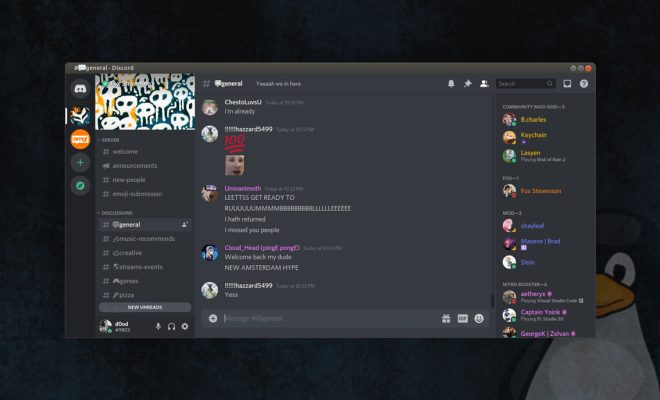
Discord is a popular communication and chat app, popular among gamers and professionals alike. Many people use Discord on their computers, and if you’re a Linux user, you may be curious about how to download and install the app on your system. Luckily, it’s a relatively simple process, and with a few steps, you can have Discord up and running on your Linux machine in no time.

First, you need to make sure that your Linux distribution meets the system requirements for Discord. Discord requires a 64-bit version of Linux, and it’s tested to work on the following distributions: Ubuntu 16.04 or newer, Fedora 28 or newer, or Debian 9 or newer. If you’re running a different distribution, you may still be able to install Discord, but it might not work as well.

Next, you’ll need to download the Discord package. The easiest way to do this is to go to the Discord website (discord.com) and choose the “Download” option from the top of the page. Then, click on the “Linux” button and select the package that matches your Linux distribution. For example, if you’re running Ubuntu, you’ll want to download the .deb package.

Once you’ve downloaded the package, you’ll need to install it on your system. The process for doing this varies depending on your Linux distribution, but in general, you can open up your file manager, navigate to the folder where the package was downloaded, and double-click on the package file. This should open your package manager and allow you to begin the installation process.

During the installation, you may be prompted for your password or asked to confirm that you want to install the package. You should carefully read any prompts and make sure that you’re installing the package from a trusted source.

Once the installation is complete, you should be able to launch Discord from your applications menu. You may be asked to log in or create an account if you haven’t already done so. After that, you should be good to go and able to use Discord to communicate with your friends or colleagues.

Overall, downloading and installing Discord on Linux is a straightforward process. By following these simple steps, you can have Discord up and running on your system in just a few minutes. Once you’ve installed Discord, you can enjoy all of the features and benefits of this popular communication app, including voice and video calls, messaging, and more. So why not give it a try and see how it can improve your online communication?

Previous Article

What Are APN Settings? How Can They ...

Next Article

How to Watch Every Netflix Show in ...

Matthew Lynch

Related articles More from author

  • Tech Advice

    Apple Watch Series 1 review: The most affordable Apple Watch is still a good option

    July 11, 2023
    By Matthew Lynch
  • Tech Advice

    T-Mobile Home Internet Review: Plans, Prices, and Speed 2023

    August 8, 2023
    By Matthew Lynch
  • Tech Advice

    Top Lenders for 3-Year Fixed Mortgage Rates in Canada

    October 20, 2023
    By Matthew Lynch
  • Tech Advice

    T-Mobile 5G Home Internet Review: A Glimpse into the Future of Connectivity

    July 8, 2023
    By Matthew Lynch
  • Tech Advice

    The 10 Biggest Energy Stocks to Watch for in 2023

    September 7, 2023
    By Matthew Lynch
  • Tech Advice

    Pixel 6A vs. Samsung Galaxy A53 vs. Nothing Phone: Under-$500 Phones Compared

    July 14, 2023
    By Matthew Lynch

Search

Login & Registration

  • Log in
  • Entries feed
  • Comments feed
  • WordPress.org

Newsletter

Signup for The Tech Edvocate Newsletter and have the latest in EdTech news and opinion delivered to your email address!

About Us

Since technology is not going anywhere and does more good than harm, adapting is the best course of action. That is where The Tech Edvocate comes in. We plan to cover the PreK-12 and Higher Education EdTech sectors and provide our readers with the latest news and opinion on the subject. From time to time, I will invite other voices to weigh in on important issues in EdTech. We hope to provide a well-rounded, multi-faceted look at the past, present, the future of EdTech in the US and internationally.

We started this journey back in June 2016, and we plan to continue it for many more years to come. I hope that you will join us in this discussion of the past, present and future of EdTech and lend your own insight to the issues that are discussed.

Newsletter

Signup for The Tech Edvocate Newsletter and have the latest in EdTech news and opinion delivered to your email address!

Contact Us

The Tech Edvocate
910 Goddin Street
Richmond, VA 23231
(601) 630-5238
[email protected]

Copyright © 2026 Matthew Lynch. All rights reserved.