The Tech Edvocate

Top Menu

  • Advertisement
  • Apps
  • Home Page
  • Home Page Five (No Sidebar)
  • Home Page Four
  • Home Page Three
  • Home Page Two
  • Home Tech2
  • Icons [No Sidebar]
  • Left Sidbear Page
  • Lynch Educational Consulting
  • My Account
  • My Speaking Page
  • Newsletter Sign Up Confirmation
  • Newsletter Unsubscription
  • Our Brands
  • Page Example
  • Privacy Policy
  • Protected Content
  • Register
  • Request a Product Review
  • Shop
  • Shortcodes Examples
  • Signup
  • Start Here
    • Governance
    • Careers
    • Contact Us
  • Terms and Conditions
  • The Edvocate
  • The Tech Edvocate Product Guide
  • Topics
  • Write For Us
  • Advertise

Main Menu

  • Start Here
    • Our Brands
    • Governance
      • Lynch Educational Consulting, LLC.
      • Dr. Lynch’s Personal Website
      • Careers
    • Write For Us
    • The Tech Edvocate Product Guide
    • Contact Us
    • Books
    • Edupedia
    • Post a Job
    • The Edvocate Podcast
    • Terms and Conditions
    • Privacy Policy
  • Topics
    • Assistive Technology
    • Child Development Tech
    • Early Childhood & K-12 EdTech
    • EdTech Futures
    • EdTech News
    • EdTech Policy & Reform
    • EdTech Startups & Businesses
    • Higher Education EdTech
    • Online Learning & eLearning
    • Parent & Family Tech
    • Personalized Learning
    • Product Reviews
  • Advertise
  • Tech Edvocate Awards
  • The Edvocate
  • Pedagogue
  • School Ratings

logo

The Tech Edvocate

  • Start Here
    • Our Brands
    • Governance
      • Lynch Educational Consulting, LLC.
      • Dr. Lynch’s Personal Website
        • My Speaking Page
      • Careers
    • Write For Us
    • The Tech Edvocate Product Guide
    • Contact Us
    • Books
    • Edupedia
    • Post a Job
    • The Edvocate Podcast
    • Terms and Conditions
    • Privacy Policy
  • Topics
    • Assistive Technology
    • Child Development Tech
    • Early Childhood & K-12 EdTech
    • EdTech Futures
    • EdTech News
    • EdTech Policy & Reform
    • EdTech Startups & Businesses
    • Higher Education EdTech
    • Online Learning & eLearning
    • Parent & Family Tech
    • Personalized Learning
    • Product Reviews
  • Advertise
  • Tech Edvocate Awards
  • The Edvocate
  • Pedagogue
  • School Ratings
  • 100 Best Apps for Data Backup

  • 100 Best Apps for Data Migration

  • 100 Best Apps for Data Transformation

  • 100 Best Apps for Data Cleaning

  • 100 Best Apps for Data Entry

  • 100 Best Apps for Business Process Automation

  • 100 Best Apps for Operational Efficiency

  • 100 Best Apps for Improving Processes

  • 100 Best Apps for Scaling Operations

  • 100 Best Apps for Community-Led Growth

Assistive Technology
Home›Assistive Technology›How to Fix It When a Fire Stick Overheats

How to Fix It When a Fire Stick Overheats
By Matthew Lynch
June 13, 2023
0
Spread the love

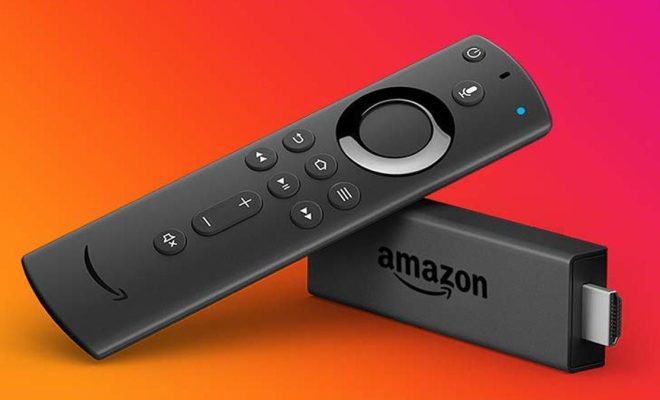
The Amazon Fire Stick is a popular streaming device, known for its convenience and ease of use. However, one common issue that users face is the Fire Stick overheating. When the device heats up, it can cause performance issues, slow loading times, and in some cases, it can cause the device to shut down completely. Fortunately, there are a few steps you can take to fix the problem.

1. Check the Placement of the Fire Stick

The first and most important step to take is to check the placement of your Fire Stick. The device should be placed in an open area with plenty of air circulation. Avoid placing it in an enclosed space or near other heat sources such as a heater or air conditioner.

2. Use a Cooling Fan

If your Fire Stick is still overheating, it’s worth investing in a cooling fan. There are several models available that are specifically designed for the Fire Stick, and they can help prevent overheating by circulating air around the device. This is a particularly useful solution if you frequently use your Fire Stick for extended periods.

3. Reduce the Display Resolution

Another simple solution is to reduce the display resolution of your Fire Stick. This can help reduce the demand on the device and therefore reduce the amount of heat generated. To do this, go to Settings > Display & Sound > Display > Video Resolution.

4. Clear Cache and Data

Over time, the cache and data on the Fire Stick can build up, which can contribute to overheating. To clear the cache and data, go to Settings > Applications > Manage Installed Applications. Select the app(s) that you want to clear, and then select Clear cache and Clear data.

5. Perform a Factory Reset

If none of the above solutions work, you may need to perform a factory reset on your Fire Stick. This will erase all data and settings, so make sure you have backed up any important information first. To do this, go to Settings > My Fire TV > Reset to Factory Defaults.

In conclusion, overheating is a common issue with the Amazon Fire Stick, but there are several solutions available to fix it. By following these steps, you can ensure that your Fire Stick is running smoothly and prevent any further problems.

Previous Article

Defraggler v2.22.995

Next Article

How to Add Music to Windows Media ...

Matthew Lynch

Related articles More from author

  • Assistive Technology

    What Is ‘Anonymous Texting’ and How to Use It

    June 6, 2023
    By Matthew Lynch
  • Assistive Technology

    How to Save Your Resume on Your Phone (and Apply for Jobs!)

    June 12, 2023
    By Matthew Lynch
  • Assistive Technology

    How to Make Your Own Career Roadmap (With Templates)

    June 22, 2023
    By Matthew Lynch
  • Assistive Technology

    Ways to Take Scrolling Screenshots on Your iPhone

    June 23, 2023
    By Matthew Lynch
  • Assistive Technology

    How to Prevent a Mac From Going to Sleep

    June 8, 2023
    By Matthew Lynch
  • Assistive Technology

    What Is Bottlenecking My PC & How Do I Fix It?

    June 23, 2023
    By Matthew Lynch

Search

Login & Registration

  • Log in
  • Entries feed
  • Comments feed
  • WordPress.org

Newsletter

Signup for The Tech Edvocate Newsletter and have the latest in EdTech news and opinion delivered to your email address!

About Us

Since technology is not going anywhere and does more good than harm, adapting is the best course of action. That is where The Tech Edvocate comes in. We plan to cover the PreK-12 and Higher Education EdTech sectors and provide our readers with the latest news and opinion on the subject. From time to time, I will invite other voices to weigh in on important issues in EdTech. We hope to provide a well-rounded, multi-faceted look at the past, present, the future of EdTech in the US and internationally.

We started this journey back in June 2016, and we plan to continue it for many more years to come. I hope that you will join us in this discussion of the past, present and future of EdTech and lend your own insight to the issues that are discussed.

Newsletter

Signup for The Tech Edvocate Newsletter and have the latest in EdTech news and opinion delivered to your email address!

Contact Us

The Tech Edvocate
910 Goddin Street
Richmond, VA 23231
(601) 630-5238
[email protected]

Copyright © 2026 Matthew Lynch. All rights reserved.