The Tech Edvocate

Top Menu

  • Advertisement
  • Apps
  • Home Page
  • Home Page Five (No Sidebar)
  • Home Page Four
  • Home Page Three
  • Home Page Two
  • Home Tech2
  • Icons [No Sidebar]
  • Left Sidbear Page
  • Lynch Educational Consulting
  • My Account
  • My Speaking Page
  • Newsletter Sign Up Confirmation
  • Newsletter Unsubscription
  • Our Brands
  • Page Example
  • Privacy Policy
  • Protected Content
  • Register
  • Request a Product Review
  • Shop
  • Shortcodes Examples
  • Signup
  • Start Here
    • Governance
    • Careers
    • Contact Us
  • Terms and Conditions
  • The Edvocate
  • The Tech Edvocate Product Guide
  • Topics
  • Write For Us
  • Advertise

Main Menu

  • Start Here
    • Our Brands
    • Governance
      • Lynch Educational Consulting, LLC.
      • Dr. Lynch’s Personal Website
      • Careers
    • Write For Us
    • The Tech Edvocate Product Guide
    • Contact Us
    • Books
    • Edupedia
    • Post a Job
    • The Edvocate Podcast
    • Terms and Conditions
    • Privacy Policy
  • Topics
    • Assistive Technology
    • Child Development Tech
    • Early Childhood & K-12 EdTech
    • EdTech Futures
    • EdTech News
    • EdTech Policy & Reform
    • EdTech Startups & Businesses
    • Higher Education EdTech
    • Online Learning & eLearning
    • Parent & Family Tech
    • Personalized Learning
    • Product Reviews
  • Advertise
  • Tech Edvocate Awards
  • The Edvocate
  • Pedagogue
  • School Ratings

logo

The Tech Edvocate

  • Start Here
    • Our Brands
    • Governance
      • Lynch Educational Consulting, LLC.
      • Dr. Lynch’s Personal Website
        • My Speaking Page
      • Careers
    • Write For Us
    • The Tech Edvocate Product Guide
    • Contact Us
    • Books
    • Edupedia
    • Post a Job
    • The Edvocate Podcast
    • Terms and Conditions
    • Privacy Policy
  • Topics
    • Assistive Technology
    • Child Development Tech
    • Early Childhood & K-12 EdTech
    • EdTech Futures
    • EdTech News
    • EdTech Policy & Reform
    • EdTech Startups & Businesses
    • Higher Education EdTech
    • Online Learning & eLearning
    • Parent & Family Tech
    • Personalized Learning
    • Product Reviews
  • Advertise
  • Tech Edvocate Awards
  • The Edvocate
  • Pedagogue
  • School Ratings
  • Zola Suite pricing 2026

  • How to become Airbnb Superhost

  • Yelp Elite status how to get

  • Rocket Matter vs CosmoLex comparison

  • Lawyaw vs Documate which is better

  • How to use Yelp for marketing

  • How many templates in Lawyaw

  • Can TripAdvisor reviews be edited

  • How to manage documents in Zola Suite

  • Filevine vs Litify features

Digital & Mobile Technology
Home›Digital & Mobile Technology›3 Simple Steps for Connecting Component Video Cables to Your TV

3 Simple Steps for Connecting Component Video Cables to Your TV
By Matthew Lynch
June 12, 2023
0
Spread the love

Component video cables are a popular way to connect devices such as DVD players, gaming consoles, and cable boxes to your TV. They offer high-quality video and audio signals, making them a great choice for anyone who wants to enjoy their favorite movies or games in high definition. In this article, we will cover three simple steps for connecting component video cables to your TV.

Step 1: Identify the Component Video Inputs on Your TV

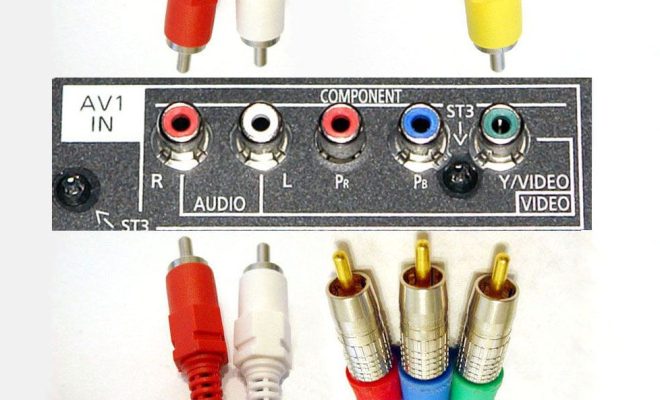
Before you can connect your component video cables, you need to locate the component video inputs on your TV. These inputs are usually labeled Y, Pb, and Pr, or sometimes just labeled as Component. They are typically located on the back or side of the TV and are color-coded green, blue, and red.

Step 2: Connect the Component Video Cables

Once you have identified the component video inputs on your TV, it is time to connect the cables. Start by connecting the green cable to the Y input, the blue cable to the Pb input, and the red cable to the Pr input. Make sure to match the colors on the cables to the corresponding inputs on the TV.

Step 3: Connect the Audio Cables

Component video cables only transmit video signals, so you will also need to connect separate audio cables to your TV. You can use either analog audio cables (red and white) or digital audio cables (optical or coaxial) to connect your audio source to your TV. Simply connect the red and white analog audio cables or the digital audio cable to their corresponding audio inputs on the TV.

Tips and Tricks

  1. When connecting your component video cables, make sure to turn off all devices to avoid damaging them.
  2. Always connect the green cable first, followed by the blue and then the red cable.
  3. If you are experiencing audio or video issues, make sure that all cables are securely connected and that the correct input is selected on your TV.

Conclusion

Connecting component video cables to your TV is a simple process that can greatly enhance your viewing experience. By following the steps outlined in this article, you can easily connect your devices to your TV and enjoy high-quality video and audio signals. Remember to take your time and double-check all connections to ensure a seamless experience.


Previous Article

WEN 56200i Portable Generator Review

Next Article

How to Transfer Photos From Your Camera ...

Matthew Lynch

Related articles More from author

  • Digital & Mobile Technology

    Best Custom PC Builder Websites

    August 5, 2023
    By Matthew Lynch
  • Digital & Mobile Technology

    How to Disable or Suspend BitLocker on Windows 10

    August 1, 2023
    By Matthew Lynch
  • Digital & Mobile Technology

    How to Use Netcat to Quickly Transfer Files between Linux Computers

    May 30, 2023
    By Matthew Lynch
  • Digital & Mobile Technology

    How Does the Linux Kernel Work? The Linux Kernel Anatomy Explained

    June 14, 2023
    By Matthew Lynch
  • Digital & Mobile Technology

    How to Delete Apps on an Android Phone

    May 31, 2023
    By Matthew Lynch
  • Digital & Mobile Technology

    How to Change Your Default Emoji Skin Tone on Slack

    July 31, 2023
    By Matthew Lynch

Search

Login & Registration

  • Log in
  • Entries feed
  • Comments feed
  • WordPress.org

Newsletter

Signup for The Tech Edvocate Newsletter and have the latest in EdTech news and opinion delivered to your email address!

About Us

Since technology is not going anywhere and does more good than harm, adapting is the best course of action. That is where The Tech Edvocate comes in. We plan to cover the PreK-12 and Higher Education EdTech sectors and provide our readers with the latest news and opinion on the subject. From time to time, I will invite other voices to weigh in on important issues in EdTech. We hope to provide a well-rounded, multi-faceted look at the past, present, the future of EdTech in the US and internationally.

We started this journey back in June 2016, and we plan to continue it for many more years to come. I hope that you will join us in this discussion of the past, present and future of EdTech and lend your own insight to the issues that are discussed.

Newsletter

Signup for The Tech Edvocate Newsletter and have the latest in EdTech news and opinion delivered to your email address!

Contact Us

The Tech Edvocate
910 Goddin Street
Richmond, VA 23231
(601) 630-5238
[email protected]

Copyright © 2026 Matthew Lynch. All rights reserved.