The Tech Edvocate

Top Menu

  • Advertisement
  • Apps
  • Home Page
  • Home Page Five (No Sidebar)
  • Home Page Four
  • Home Page Three
  • Home Page Two
  • Home Tech2
  • Icons [No Sidebar]
  • Left Sidbear Page
  • Lynch Educational Consulting
  • My Account
  • My Speaking Page
  • Newsletter Sign Up Confirmation
  • Newsletter Unsubscription
  • Our Brands
  • Page Example
  • Privacy Policy
  • Protected Content
  • Register
  • Request a Product Review
  • Shop
  • Shortcodes Examples
  • Signup
  • Start Here
    • Governance
    • Careers
    • Contact Us
  • Terms and Conditions
  • The Edvocate
  • The Tech Edvocate Product Guide
  • Topics
  • Write For Us
  • Advertise

Main Menu

  • Start Here
    • Our Brands
    • Governance
      • Lynch Educational Consulting, LLC.
      • Dr. Lynch’s Personal Website
      • Careers
    • Write For Us
    • The Tech Edvocate Product Guide
    • Contact Us
    • Books
    • Edupedia
    • Post a Job
    • The Edvocate Podcast
    • Terms and Conditions
    • Privacy Policy
  • Topics
    • Assistive Technology
    • Child Development Tech
    • Early Childhood & K-12 EdTech
    • EdTech Futures
    • EdTech News
    • EdTech Policy & Reform
    • EdTech Startups & Businesses
    • Higher Education EdTech
    • Online Learning & eLearning
    • Parent & Family Tech
    • Personalized Learning
    • Product Reviews
  • Advertise
  • Tech Edvocate Awards
  • The Edvocate
  • Pedagogue
  • School Ratings

logo

The Tech Edvocate

  • Start Here
    • Our Brands
    • Governance
      • Lynch Educational Consulting, LLC.
      • Dr. Lynch’s Personal Website
        • My Speaking Page
      • Careers
    • Write For Us
    • The Tech Edvocate Product Guide
    • Contact Us
    • Books
    • Edupedia
    • Post a Job
    • The Edvocate Podcast
    • Terms and Conditions
    • Privacy Policy
  • Topics
    • Assistive Technology
    • Child Development Tech
    • Early Childhood & K-12 EdTech
    • EdTech Futures
    • EdTech News
    • EdTech Policy & Reform
    • EdTech Startups & Businesses
    • Higher Education EdTech
    • Online Learning & eLearning
    • Parent & Family Tech
    • Personalized Learning
    • Product Reviews
  • Advertise
  • Tech Edvocate Awards
  • The Edvocate
  • Pedagogue
  • School Ratings
  • Why Your Mortgage Could Be Denied by Biased AI – And What the Fed Is Doing About It

  • Unprecedented: Lawsuit Demands Total AI Shutdown Amid Rising Global Panic

  • The Astonishing Truth: Microcredentials Now Trump MBAs for Data Science Jobs

  • The Astonishing Twist: AI Cuts Your Job, Then Helps You Sue Your Boss

  • The Staggering Truth About Palo Alto’s $4.5 Billion AI Bet

  • Mind-Blowing: Satellite Metals Now Outweigh Meteoroids, Sparking Urgent Insurance Crisis

  • The Silent Threat From Above: Your Sky Is Changing, And Here’s Why

  • The AI Property Management Revolution: Visitt MCP’s Astonishing Edge

  • Why Your Home Needs These 9 Groundbreaking Battery Storage Solutions by 2027

  • Devastating Data Breach Exposes Millions: What You MUST Know Now

Assistive Technology
Home›Assistive Technology›How to Fix Steamui.dll Not Found or Missing Errors

How to Fix Steamui.dll Not Found or Missing Errors
By Matthew Lynch
June 10, 2023
0
Spread the love

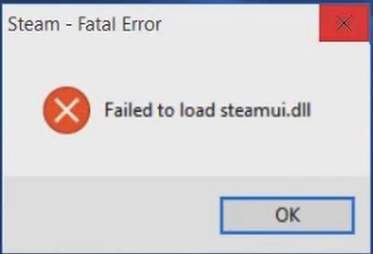
Steam is one of the most popular gaming platforms in the world. However, like with any software, issues can occur. One of the most common problems with Steam is the Steamui.dll not found or missing errors.

The Steamui.dll file is an essential component of the Steam client. It is responsible for displaying the user interface and allowing you to access and manage your games. If this DLL file is missing or not found, you won’t be able to open Steam and play your favorite games.

Fortunately, there are several ways to fix Steamui.dll not found or missing errors.

1. Restart Your Computer

Sometimes, the easiest solution is the most effective. Restarting your computer can often fix common errors, including Steamui.dll not found or missing errors. This will refresh your system’s memory and clear any temporary files that could be causing the issue.

2. Run Steam as Administrator

Running Steam as an administrator can also help to prevent Steamui.dll not found or missing errors. To do this, right-click on the Steam icon and select “Run as administrator.” This will give Steam the necessary permissions to access all the required files, including Steamui.dll.

3. Verify the Integrity of Steam Files

Steam has a built-in feature that allows you to verify the integrity of game files. This can fix issues with missing or corrupted files, including Steamui.dll. To do this, follow these steps:

– Open Steam and go to your Library
– Right-click on the game that is giving you the Steamui.dll error and select “Properties”
– Click on the “Local Files” tab
– Click “Verify Integrity of Game Files”
– Wait for the verification process to finish

4. Reinstall Steam

If none of the above solutions work, you may need to reinstall Steam. This will replace any missing files and ensure that Steamui.dll is properly installed. Follow these steps to reinstall Steam:

– Uninstall Steam from your computer
– Download the latest version of Steam from the official website
– Install Steam and follow the setup instructions

5. Use System Restore

If you recently updated your PC or installed new software, that could be causing the Steamui.dll error. You can try using the Windows System Restore feature to go back to a previous point in time when Steam was working correctly. To do this, follow these steps:

– Press the Windows Key + R to open the Run dialog box
– Type “rstrui” and hit Enter
– Follow the on-screen instructions to select a restore point

Conclusion

The Steamui.dll not found or missing errors can be frustrating, but there are several ways to fix the issue. Try restarting your computer, running Steam as an administrator, verifying the integrity of game files, reinstalling Steam, or using the System Restore feature. If none of these solutions work, contact Steam support for further assistance. 

Previous Article

Should You Buy a Dash Cam?

Next Article

Pokémon Diamond Action Replay Codes for Nintendo ...

Matthew Lynch

Related articles More from author

  • Assistive Technology

    How to Change Resolutions on Your PS5

    June 23, 2023
    By Matthew Lynch
  • Assistive Technology

    How to Sign a PDF on Android

    June 10, 2023
    By Matthew Lynch
  • Assistive Technology

    How to Work With a PostgreSQL Database Using psql Commands

    June 22, 2023
    By Matthew Lynch
  • Assistive Technology

    How to Create a Custom Template in Microsoft Word

    June 21, 2023
    By Matthew Lynch
  • Assistive Technology

    How to Set up an Email Signature in GoDaddy Webmail

    June 10, 2023
    By Matthew Lynch
  • Assistive Technology

    How to Undo and Redo Changes in Photoshop

    September 7, 2023
    By Matthew Lynch

Search

Login & Registration

  • Log in
  • Entries feed
  • Comments feed
  • WordPress.org

Newsletter

Signup for The Tech Edvocate Newsletter and have the latest in EdTech news and opinion delivered to your email address!

About Us

Since technology is not going anywhere and does more good than harm, adapting is the best course of action. That is where The Tech Edvocate comes in. We plan to cover the PreK-12 and Higher Education EdTech sectors and provide our readers with the latest news and opinion on the subject. From time to time, I will invite other voices to weigh in on important issues in EdTech. We hope to provide a well-rounded, multi-faceted look at the past, present, the future of EdTech in the US and internationally.

We started this journey back in June 2016, and we plan to continue it for many more years to come. I hope that you will join us in this discussion of the past, present and future of EdTech and lend your own insight to the issues that are discussed.

Newsletter

Signup for The Tech Edvocate Newsletter and have the latest in EdTech news and opinion delivered to your email address!

Contact Us

The Tech Edvocate
910 Goddin Street
Richmond, VA 23231
(601) 630-5238
[email protected]

Copyright © 2026 Matthew Lynch. All rights reserved.