The Tech Edvocate

Top Menu

  • Advertisement
  • Apps
  • Home Page
  • Home Page Five (No Sidebar)
  • Home Page Four
  • Home Page Three
  • Home Page Two
  • Home Tech2
  • Icons [No Sidebar]
  • Left Sidbear Page
  • Lynch Educational Consulting
  • My Account
  • My Speaking Page
  • Newsletter Sign Up Confirmation
  • Newsletter Unsubscription
  • Our Brands
  • Page Example
  • Privacy Policy
  • Protected Content
  • Register
  • Request a Product Review
  • Shop
  • Shortcodes Examples
  • Signup
  • Start Here
    • Governance
    • Careers
    • Contact Us
  • Terms and Conditions
  • The Edvocate
  • The Tech Edvocate Product Guide
  • Topics
  • Write For Us
  • Advertise

Main Menu

  • Start Here
    • Our Brands
    • Governance
      • Lynch Educational Consulting, LLC.
      • Dr. Lynch’s Personal Website
      • Careers
    • Write For Us
    • The Tech Edvocate Product Guide
    • Contact Us
    • Books
    • Edupedia
    • Post a Job
    • The Edvocate Podcast
    • Terms and Conditions
    • Privacy Policy
  • Topics
    • Assistive Technology
    • Child Development Tech
    • Early Childhood & K-12 EdTech
    • EdTech Futures
    • EdTech News
    • EdTech Policy & Reform
    • EdTech Startups & Businesses
    • Higher Education EdTech
    • Online Learning & eLearning
    • Parent & Family Tech
    • Personalized Learning
    • Product Reviews
  • Advertise
  • Tech Edvocate Awards
  • The Edvocate
  • Pedagogue
  • School Ratings

logo

The Tech Edvocate

  • Start Here
    • Our Brands
    • Governance
      • Lynch Educational Consulting, LLC.
      • Dr. Lynch’s Personal Website
        • My Speaking Page
      • Careers
    • Write For Us
    • The Tech Edvocate Product Guide
    • Contact Us
    • Books
    • Edupedia
    • Post a Job
    • The Edvocate Podcast
    • Terms and Conditions
    • Privacy Policy
  • Topics
    • Assistive Technology
    • Child Development Tech
    • Early Childhood & K-12 EdTech
    • EdTech Futures
    • EdTech News
    • EdTech Policy & Reform
    • EdTech Startups & Businesses
    • Higher Education EdTech
    • Online Learning & eLearning
    • Parent & Family Tech
    • Personalized Learning
    • Product Reviews
  • Advertise
  • Tech Edvocate Awards
  • The Edvocate
  • Pedagogue
  • School Ratings
  • The Silent Revolution: How AI Property Valuation Is Quietly Reshaping Real Estate

  • The Astonishing Truth: Why Your Dream Car Is Now a $52,000 Illusion

  • Toxic Algorithms: Why Your Bank’s AI Could Cost You Everything

  • OpenAI’s GPT-6 Cyber: A Dangerous New AI Threat or Our Ultimate Digital Guardian?

  • This Game-Changing Natural Ozempic Alternative Just Blew Up on Social Media

  • Bónuszösszeg, ingyen pörgetés és befizetési feltétel: üdvözlő és befizetés nélküli kaszinóajánlatok magyar játékosoknak

  • 9 Critical Reasons Why Athexio Might Be The Investment You Need (Or Should Avoid)

  • A Single Breakthrough Could Finally Kill Range Anxiety for Millions of EV Owners

  • Your Money, Their AI: The Secret Agents Invading Bank Accounts

  • US Battery as a Service Market Shifts Toward Fleet-Based Energy

Digital & Mobile Technology
Home›Digital & Mobile Technology›How to Send a Large Video From iPhone

How to Send a Large Video From iPhone
By Matthew Lynch
June 1, 2023
0
Spread the love

As smartphones become more advanced, their camera and video capabilities also improve. These advancements allow us to capture high-quality videos on our iPhones, but the drawback is that these large video files can be difficult to share. Emailing or messaging a video can be impractical due to file size limits. Fortunately, there are several ways to send large videos from an iPhone. In this article, we’ll explore some of the best methods for sending large videos from your iPhone.

Method 1: Use iCloud

iCloud is Apple’s cloud storage service that allows you to store and share files between devices. If you have an iCloud account, you can easily share large videos from your iPhone using iCloud. To do this, follow these steps:

1. Open the Photos app on your iPhone and select the video you want to share.
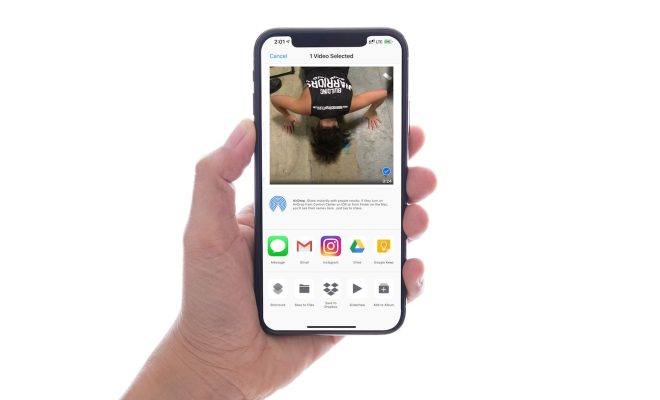
2. Tap the “Share” button, which looks like a box with an arrow pointing up.
3. Select “Add to iCloud Drive” from the list of options.
4. A pop-up will appear asking you to choose the folder in which you want to save the video. Select the appropriate folder and tap “Add”.
5. Once the video is saved to iCloud, you can access it from any device that is also signed in to your iCloud account.
6. To share the video, navigate to the iCloud Drive app and select the video you want to share.
7. Tap the “Share” button and select the method you want to use to share the video, such as email or messaging.

Method 2: Use a File Transfer App

There are several file transfer apps available for iOS that allow you to send large videos from your iPhone to another device. Some of the most popular file transfer apps are Dropbox, Google Drive, and WeTransfer. To use these apps to send a large video from your iPhone, follow these steps:

1. Download and install the file transfer app of your choice from the App Store.
2. Open the app and follow the prompts to create an account or sign in.
3. Upload the video to the app by tapping the “Upload” or “+” button.
4. Once the video is uploaded, you can share it by selecting the appropriate sharing option from the app.

Method 3: Use AirDrop

AirDrop is a feature built into iOS that allows you to wirelessly transfer files between Apple devices. To use AirDrop to send a large video from your iPhone, follow these steps:

1. Open the “Photos” app on your iPhone and select the video you want to share.
2. Tap the “Share” button, which looks like a box with an arrow pointing up.
3. On the list of sharing options, select the device you want to send the video to.
4. If the device you want to send the video to is not on the list, make sure that AirDrop is enabled on that device.
5. Once you select the device, the video will be sent wirelessly to that device.

In conclusion, sending large videos from an iPhone is now easier than ever with these methods. Whether you want to use iCloud, a file transfer app, or AirDrop, these options offer quick and efficient ways to share your videos with friends and family. With these methods, you can share high-quality videos without compromising their quality.


Previous Article

What Is Spotify and How Does It ...

Next Article

Best USB Headsets of 2023

Matthew Lynch

Related articles More from author

  • Digital & Mobile Technology

    How to Use the Tracert Command in Windows

    June 1, 2023
    By Matthew Lynch
  • Digital & Mobile Technology

    The 4 Best Face Recognition Apps for Android in 2023

    June 10, 2023
    By Matthew Lynch
  • Digital & Mobile Technology

    Why is My WiFi So Slow: Tracking Down the Culprits

    May 29, 2023
    By Matthew Lynch
  • Digital & Mobile Technology

    Eclipse Keyboard Shortcuts Essential for Beginners

    June 5, 2023
    By Matthew Lynch
  • Digital & Mobile Technology

    What Does the iPad Home Button Do?

    June 23, 2023
    By Matthew Lynch
  • Digital & Mobile Technology

    Acer Chromebook 15 Review

    June 10, 2023
    By Matthew Lynch

Search

Login & Registration

  • Log in
  • Entries feed
  • Comments feed
  • WordPress.org

Newsletter

Signup for The Tech Edvocate Newsletter and have the latest in EdTech news and opinion delivered to your email address!

About Us

Since technology is not going anywhere and does more good than harm, adapting is the best course of action. That is where The Tech Edvocate comes in. We plan to cover the PreK-12 and Higher Education EdTech sectors and provide our readers with the latest news and opinion on the subject. From time to time, I will invite other voices to weigh in on important issues in EdTech. We hope to provide a well-rounded, multi-faceted look at the past, present, the future of EdTech in the US and internationally.

We started this journey back in June 2016, and we plan to continue it for many more years to come. I hope that you will join us in this discussion of the past, present and future of EdTech and lend your own insight to the issues that are discussed.

Newsletter

Signup for The Tech Edvocate Newsletter and have the latest in EdTech news and opinion delivered to your email address!

Contact Us

The Tech Edvocate
910 Goddin Street
Richmond, VA 23231
(601) 630-5238
[email protected]

Copyright © 2026 Matthew Lynch. All rights reserved.