The Tech Edvocate

Top Menu

  • Advertisement
  • Apps
  • Home Page
  • Home Page Five (No Sidebar)
  • Home Page Four
  • Home Page Three
  • Home Page Two
  • Home Tech2
  • Icons [No Sidebar]
  • Left Sidbear Page
  • Lynch Educational Consulting
  • My Account
  • My Speaking Page
  • Newsletter Sign Up Confirmation
  • Newsletter Unsubscription
  • Our Brands
  • Page Example
  • Privacy Policy
  • Protected Content
  • Register
  • Request a Product Review
  • Shop
  • Shortcodes Examples
  • Signup
  • Start Here
    • Governance
    • Careers
    • Contact Us
  • Terms and Conditions
  • The Edvocate
  • The Tech Edvocate Product Guide
  • Topics
  • Write For Us
  • Advertise

Main Menu

  • Start Here
    • Our Brands
    • Governance
      • Lynch Educational Consulting, LLC.
      • Dr. Lynch’s Personal Website
      • Careers
    • Write For Us
    • The Tech Edvocate Product Guide
    • Contact Us
    • Books
    • Edupedia
    • Post a Job
    • The Edvocate Podcast
    • Terms and Conditions
    • Privacy Policy
  • Topics
    • Assistive Technology
    • Child Development Tech
    • Early Childhood & K-12 EdTech
    • EdTech Futures
    • EdTech News
    • EdTech Policy & Reform
    • EdTech Startups & Businesses
    • Higher Education EdTech
    • Online Learning & eLearning
    • Parent & Family Tech
    • Personalized Learning
    • Product Reviews
  • Advertise
  • Tech Edvocate Awards
  • The Edvocate
  • Pedagogue
  • School Ratings

logo

The Tech Edvocate

  • Start Here
    • Our Brands
    • Governance
      • Lynch Educational Consulting, LLC.
      • Dr. Lynch’s Personal Website
        • My Speaking Page
      • Careers
    • Write For Us
    • The Tech Edvocate Product Guide
    • Contact Us
    • Books
    • Edupedia
    • Post a Job
    • The Edvocate Podcast
    • Terms and Conditions
    • Privacy Policy
  • Topics
    • Assistive Technology
    • Child Development Tech
    • Early Childhood & K-12 EdTech
    • EdTech Futures
    • EdTech News
    • EdTech Policy & Reform
    • EdTech Startups & Businesses
    • Higher Education EdTech
    • Online Learning & eLearning
    • Parent & Family Tech
    • Personalized Learning
    • Product Reviews
  • Advertise
  • Tech Edvocate Awards
  • The Edvocate
  • Pedagogue
  • School Ratings
  • This One Skill Is Quietly Reshaping Every Career — And How to Master It Now

  • The Silent Threat: How AI Is Reshaping Recent College Graduates’ Job Prospects

  • This Crucial Shift in AI Will Devastate Millions of College Grads

  • The Brutal Truth: Zero-Day Exploit Analysis vs. Traditional Cybersecurity Careers — Which Path Pays $300,000?

  • The Urgent Truth: Why These Certifications Are Your Only Defense Against Zero-Day Attacks

  • The FBI Investigates a Zero-Day Attack on Your Job Applications

  • The Startling Truth About AI’s Impact on Your Coding Job by 2026

  • The Shocking Truth About Your Code: AI Is Already Rewriting Your Future

  • Is This Why Code Review Is Dead? AI’s Staggering Impact on Tech Jobs

  • The Shocking Truth About CogniBoost vs Focus Drugs: What No One Is Telling You

Digital & Mobile Technology
Home›Digital & Mobile Technology›How to Activate Windows 11 for Free: 2 Best Ways

How to Activate Windows 11 for Free: 2 Best Ways
By Matthew Lynch
May 17, 2023
0
Spread the love

Windows 11 has taken the tech world by storm, from its impressive new look to its innovative features. However, getting your hands on this latest operating system can be an expensive affair. Many users are looking for ways to activate Windows 11 for free. In this article, we will walk you through the two best ways to activate Windows 11 for free.

Method 1 – Using a Product Key

Windows 11 requires a valid product key to activate. If you have purchased a new PC that came with a pre-installed Windows 11, you should have a product key on a sticker on the box or on the back of the device.

If you do not have a product key, you can still acquire one for free. Here are the steps:

Step 1: Go to Microsoft’s official website to download the Windows 11 installation tool.

Step 2: Create a bootable USB drive or DVD drive for Windows 11 installation using the tool.

Step 3: Install Windows 11 on your device and skip the step where it asks for a product key.

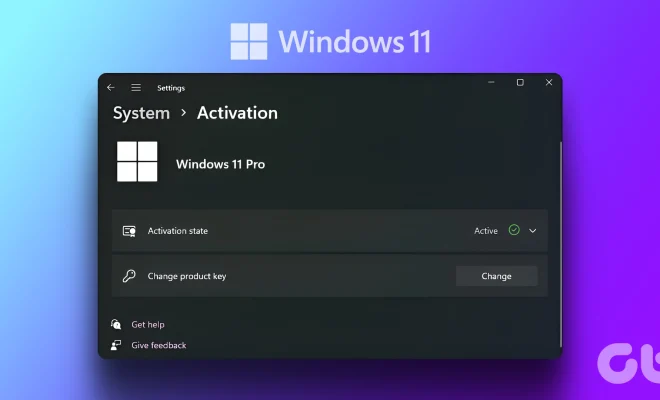
Step 4: Once the installation is complete, go to the “Activation” tab in the “Settings” window.

Step 5: Click on the “Change product key” option, enter the generic product key “YTMG3-N6DKC-DKB77-7M9GH-8HVX7”, and click on the “Activate” button.

Method 2 – Using KMSpico Activator

KMSpico is a popular tool that is widely used to activate Windows operating systems. Here are the steps to activate Windows 11 using KMSpico:

Step 1: Download KMSpico from its official website and extract the files.

Step 2: Disable your Antivirus software and firewall temporarily.

Step 3: Run the KMSpico executable file as an administrator.

Step 4: Click on the “Activate Windows” icon, and wait for the process to complete.

Step 5: Restart your device, and Windows 11 will be activated.

Conclusion

In conclusion, activating Windows 11 for free is possible through the two methods mentioned above. Using a product key is the most straightforward method, but if you do not have one, KMSpico activator is a reliable option. However, keep in mind that using unauthorized methods to activate Windows is not recommended, and it may raise security concerns. It is always better to use the authorized way and support the development of Windows by purchasing a license.

Previous Article

How to Activate a Sprint Phone Over ...

Next Article

How to Activate a TracFone When a ...

Matthew Lynch

Related articles More from author

  • Digital & Mobile Technology

    Overview of the macOS Displays Preference Pane

    July 31, 2023
    By Matthew Lynch
  • Digital & Mobile Technology

    The Best Apps for Learning Chess on Your Phone

    June 5, 2023
    By Matthew Lynch
  • Digital & Mobile Technology

    Best Tools to Extract Zip and Rar Files Online

    April 11, 2023
    By Matthew Lynch
  • Digital & Mobile Technology

    Guide to Wireless Speakers for Home Theaters

    June 21, 2023
    By Matthew Lynch
  • Digital & Mobile Technology

    How to Enable XMP

    June 23, 2023
    By Matthew Lynch
  • Digital & Mobile Technology

    How to Use iPhone DFU Mode

    July 5, 2023
    By Matthew Lynch

Search

Login & Registration

  • Log in
  • Entries feed
  • Comments feed
  • WordPress.org

Newsletter

Signup for The Tech Edvocate Newsletter and have the latest in EdTech news and opinion delivered to your email address!

About Us

Since technology is not going anywhere and does more good than harm, adapting is the best course of action. That is where The Tech Edvocate comes in. We plan to cover the PreK-12 and Higher Education EdTech sectors and provide our readers with the latest news and opinion on the subject. From time to time, I will invite other voices to weigh in on important issues in EdTech. We hope to provide a well-rounded, multi-faceted look at the past, present, the future of EdTech in the US and internationally.

We started this journey back in June 2016, and we plan to continue it for many more years to come. I hope that you will join us in this discussion of the past, present and future of EdTech and lend your own insight to the issues that are discussed.

Newsletter

Signup for The Tech Edvocate Newsletter and have the latest in EdTech news and opinion delivered to your email address!

Contact Us

The Tech Edvocate
910 Goddin Street
Richmond, VA 23231
(601) 630-5238
[email protected]

Copyright © 2026 Matthew Lynch. All rights reserved.