The Tech Edvocate

Top Menu

  • Advertisement
  • Apps
  • Home Page
  • Home Page Five (No Sidebar)
  • Home Page Four
  • Home Page Three
  • Home Page Two
  • Home Tech2
  • Icons [No Sidebar]
  • Left Sidbear Page
  • Lynch Educational Consulting
  • My Account
  • My Speaking Page
  • Newsletter Sign Up Confirmation
  • Newsletter Unsubscription
  • Our Brands
  • Page Example
  • Privacy Policy
  • Protected Content
  • Register
  • Request a Product Review
  • Shop
  • Shortcodes Examples
  • Signup
  • Start Here
    • Governance
    • Careers
    • Contact Us
  • Terms and Conditions
  • The Edvocate
  • The Tech Edvocate Product Guide
  • Topics
  • Write For Us
  • Advertise

Main Menu

  • Start Here
    • Our Brands
    • Governance
      • Lynch Educational Consulting, LLC.
      • Dr. Lynch’s Personal Website
      • Careers
    • Write For Us
    • The Tech Edvocate Product Guide
    • Contact Us
    • Books
    • Edupedia
    • Post a Job
    • The Edvocate Podcast
    • Terms and Conditions
    • Privacy Policy
  • Topics
    • Assistive Technology
    • Child Development Tech
    • Early Childhood & K-12 EdTech
    • EdTech Futures
    • EdTech News
    • EdTech Policy & Reform
    • EdTech Startups & Businesses
    • Higher Education EdTech
    • Online Learning & eLearning
    • Parent & Family Tech
    • Personalized Learning
    • Product Reviews
  • Advertise
  • Tech Edvocate Awards
  • The Edvocate
  • Pedagogue
  • School Ratings

logo

The Tech Edvocate

  • Start Here
    • Our Brands
    • Governance
      • Lynch Educational Consulting, LLC.
      • Dr. Lynch’s Personal Website
        • My Speaking Page
      • Careers
    • Write For Us
    • The Tech Edvocate Product Guide
    • Contact Us
    • Books
    • Edupedia
    • Post a Job
    • The Edvocate Podcast
    • Terms and Conditions
    • Privacy Policy
  • Topics
    • Assistive Technology
    • Child Development Tech
    • Early Childhood & K-12 EdTech
    • EdTech Futures
    • EdTech News
    • EdTech Policy & Reform
    • EdTech Startups & Businesses
    • Higher Education EdTech
    • Online Learning & eLearning
    • Parent & Family Tech
    • Personalized Learning
    • Product Reviews
  • Advertise
  • Tech Edvocate Awards
  • The Edvocate
  • Pedagogue
  • School Ratings
  • Can Clio accept client payments

  • How to dispatch jobs in FieldAware

  • Can ServiceTitan do call booking

  • How to onboard construction workers BambooHR

  • Is FieldAware worth it for contractors

  • How many users in Jobber

  • Can JobNimbus track leads

  • How to create estimates in Housecall Pro

  • How many users in mHelpDesk

  • How to track certifications in BambooHR construction

EdTech & Innovation
Home›EdTech & Innovation›Five Ways to Leverage Wearable Technology in the Classroom

Five Ways to Leverage Wearable Technology in the Classroom
By Matthew Lynch
June 13, 2017
0
Spread the love

There is no doubt that technology both improves and complicates education.  Technology can turn education into a more interactive, global experience, though it also raises new issues regarding classroom management and student misuse of class time.  However, with guidance and dedication, teachers can implement wearable technology to help students engage with lessons on a deeper, more intrinsic level.  Here are 5 ways educators can leverage wearable technology to enhance student engagement.

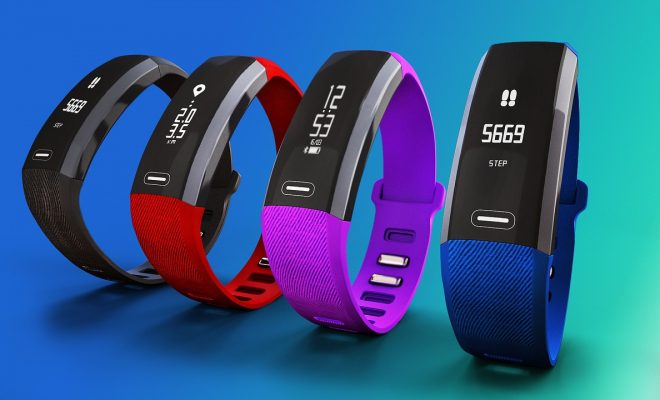
1.      Fitness Trackers

Fitness trackers, like FitBit or the Adidas Zone, can help students take ownership of their physical education and health classes.  Instead of running a mile only once a week, students can monitor their daily fitness growth and progress over the term of the class.  Physical education teachers can assign fitness homework and have access to monitoring, track the students as they make and reach health and fitness goals, and adjust their classes to accommodate the students’ changing fitness levels.  This can make fitness goals and tests less competitive since physical competition can be intimidating for some students.  On the other hand, students who are motivated by competition can enter into small-group competitions through their fitness trackers.

2.      Virtual Reality

History, civics, and language teachers can make instruction true-to-life through the use of virtual reality headsets in their classrooms.  Virtual reality allows users to feel immersed in another place or experience, an invaluable asset for students learning about foreign cultures, cities, or ancient empires.  Teachers can lead virtual tours through the cities and events they’re teaching about, instead of relying on pictures, posters, and slideshows.  Students can move from reading about a country to viewing its geography on a map, to walking the streets of its cities using virtual reality headgear.

3.      Smart Watches

Smartwatches are a great way to enhance student-teacher communication and help students hold themselves accountable.  Smartwatches increase students’ ability to self-monitor and self-regulate their learning experiences.  Smartwatches can be synced to a user’s phone or tablet and can increase communication between teachers and students.  Students can send questions to a teacher remotely (if they’re too shy to ask aloud), schedule and receive reminders about school work, or be used as an alarm or remote.

4.      GoPro and Video Recorders

GoPro is just one of several portable, wearable video recorders on the market.  They can be used by teachers to record lessons and in-class experiences to be used by students who are absent or unable to attend traditional school, or they can be used to enhance the learning environment.  GoPro allows the student to take the driver’s seat in exploring the world around them as it relates to the curriculum of a class, especially in journalism, communication, and television production classes.

5.      Google Glass

Google Glasses are perhaps the pinnacle of wearable technology.  They take all the capabilities of a phone or tablet and wrap them around a student’s head in a pair of glasses.  They are equipped with 4G and wireless internet technology, meaning that students can use them for both classroom input as well as output.  Teachers can communicate with students, watch a student’s process (and not just the final result) in doing work through the Google Glass’ camera, and communicate with them in real-time, even when the students are at home.  Google Glass is also hands-free, meaning it won’t interfere with the students’ other in-class tasks.

While these wearable technologies have creative uses in the regular education classroom, there are also a lot of exciting implications for special education students as well.  Students with autism, for example, who may have difficulty communicating may find comfort in constant access to technology – like the Google Glass or smart watches – that allow them to view and communicate from behind a comfortable distance.  These technologies also allow students to demonstrate their learning and understanding in deeper, more practical ways than traditional standardized tests or pen-and-paper responses.

Technology may offer certain temptations to students – Facebook, Instagram, and Twitter are easy to use for personal, non-academic reasons – and may at times make it harder for teachers to monitor their students, but the potential benefits of wearable technology far outweigh these hypothetical challenges.  Wearable technology can make education more accessible, meaningful, and engaging for students of all abilities and interests.




TagsEdtechedtechchatelearningSTEAMSTEM
Previous Article

OPINION: Why creating and maintaining accessible digital ...

Next Article

10 Apps to Help Students With Their ...

Matthew Lynch

Related articles More from author

  • EdTech FuturesOnline Learning & eLearning

    Ask An Expert: K-12 Online Learning as a Life Skill

    April 13, 2017
    By Matthew Lynch
  • Early Childhood & K-12 EdTechEdTech Policy & Reform

    7 Ingenious Ways to Use Edtech in the Classroom, While Meeting the Common Core Standards

    January 4, 2017
    By Matthew Lynch
  • EdTech & Innovation

    10 Tips for EdTech Entrepreneurs

    March 17, 2017
    By Matthew Lynch
  • EdTech NewsOnline Learning & eLearning

    The world learns a lesson that technology in schools doesn’t improve education

    June 27, 2016
    By Matthew Lynch
  • Uncategorized

    Should My Child Have a Cellphone? Appropriate Ages and Stages of Use

    November 28, 2016
    By Matthew Lynch
  • Early Childhood & K-12 EdTechHigher Education EdTechPersonalized Learning

    What Are the Benefits of Learning Analytics?

    August 27, 2017
    By Matthew Lynch

Search

Login & Registration

  • Log in
  • Entries feed
  • Comments feed
  • WordPress.org

Newsletter

Signup for The Tech Edvocate Newsletter and have the latest in EdTech news and opinion delivered to your email address!

About Us

Since technology is not going anywhere and does more good than harm, adapting is the best course of action. That is where The Tech Edvocate comes in. We plan to cover the PreK-12 and Higher Education EdTech sectors and provide our readers with the latest news and opinion on the subject. From time to time, I will invite other voices to weigh in on important issues in EdTech. We hope to provide a well-rounded, multi-faceted look at the past, present, the future of EdTech in the US and internationally.

We started this journey back in June 2016, and we plan to continue it for many more years to come. I hope that you will join us in this discussion of the past, present and future of EdTech and lend your own insight to the issues that are discussed.

Newsletter

Signup for The Tech Edvocate Newsletter and have the latest in EdTech news and opinion delivered to your email address!

Contact Us

The Tech Edvocate
910 Goddin Street
Richmond, VA 23231
(601) 630-5238
[email protected]

Copyright © 2026 Matthew Lynch. All rights reserved.