The Tech Edvocate

Top Menu

  • Advertisement
  • Apps
  • Home Page
  • Home Page Five (No Sidebar)
  • Home Page Four
  • Home Page Three
  • Home Page Two
  • Home Tech2
  • Icons [No Sidebar]
  • Left Sidbear Page
  • Lynch Educational Consulting
  • My Account
  • My Speaking Page
  • Newsletter Sign Up Confirmation
  • Newsletter Unsubscription
  • Our Brands
  • Page Example
  • Privacy Policy
  • Protected Content
  • Register
  • Request a Product Review
  • Shop
  • Shortcodes Examples
  • Signup
  • Start Here
    • Governance
    • Careers
    • Contact Us
  • Terms and Conditions
  • The Edvocate
  • The Tech Edvocate Product Guide
  • Topics
  • Write For Us
  • Advertise

Main Menu

  • Start Here
    • Our Brands
    • Governance
      • Lynch Educational Consulting, LLC.
      • Dr. Lynch’s Personal Website
      • Careers
    • Write For Us
    • The Tech Edvocate Product Guide
    • Contact Us
    • Books
    • Edupedia
    • Post a Job
    • The Edvocate Podcast
    • Terms and Conditions
    • Privacy Policy
  • Topics
    • Assistive Technology
    • Child Development Tech
    • Early Childhood & K-12 EdTech
    • EdTech Futures
    • EdTech News
    • EdTech Policy & Reform
    • EdTech Startups & Businesses
    • Higher Education EdTech
    • Online Learning & eLearning
    • Parent & Family Tech
    • Personalized Learning
    • Product Reviews
  • Advertise
  • Tech Edvocate Awards
  • The Edvocate
  • Pedagogue
  • School Ratings

logo

The Tech Edvocate

  • Start Here
    • Our Brands
    • Governance
      • Lynch Educational Consulting, LLC.
      • Dr. Lynch’s Personal Website
        • My Speaking Page
      • Careers
    • Write For Us
    • The Tech Edvocate Product Guide
    • Contact Us
    • Books
    • Edupedia
    • Post a Job
    • The Edvocate Podcast
    • Terms and Conditions
    • Privacy Policy
  • Topics
    • Assistive Technology
    • Child Development Tech
    • Early Childhood & K-12 EdTech
    • EdTech Futures
    • EdTech News
    • EdTech Policy & Reform
    • EdTech Startups & Businesses
    • Higher Education EdTech
    • Online Learning & eLearning
    • Parent & Family Tech
    • Personalized Learning
    • Product Reviews
  • Advertise
  • Tech Edvocate Awards
  • The Edvocate
  • Pedagogue
  • School Ratings
  • Stunning: 93,000 Nursing School Applicants Rejected — Here’s Why It’s a Crisis

  • One Ancient PHP Bug Hid for 14 Years — Until AI Found It in 7 Days

  • The Brutal Truth: Why 12 Million Users Couldn’t Save Character.AI From Bankruptcy

  • Unbelievable: AI Agent Swarms Are Hacking Half the Internet — Here’s What You Need to Know

  • The Chilling Truth: AI Cyber Attacks Are Here, And We’re Not Ready

  • Unveiling the Hidden Threat: How AI Disruption in Banking Could Reshape Your Financial Future

  • Cazinourile online nou lansate: cum sunt prezentate și actualizate informațiile despre promoții

  • Autonomous Ransomware AI Agents Are Here — And They’re Targeting Your Power Grid

  • Unprecedented: This One Thing Is Crushing Major AI Investments

  • Rotirile gratuite fără depunere: activarea rundelor și creditarea câștigurilor

Tech Advice
Home›Tech Advice›Hot corners on MacOS: What they are, why you need them and how to use them

Hot corners on MacOS: What they are, why you need them and how to use them
By Matthew Lynch
July 13, 2023
0
Spread the love

Introduction:

MacOS, a powerful and user-friendly operating system developed by Apple, continually introduces new features aimed at improving productivity and enhancing user experiences. One such handy feature is Hot Corners. In this article, we’ll explore what Hot Corners are, why you might need them, and how to enable and customize them on your Mac.

What are Hot Corners?

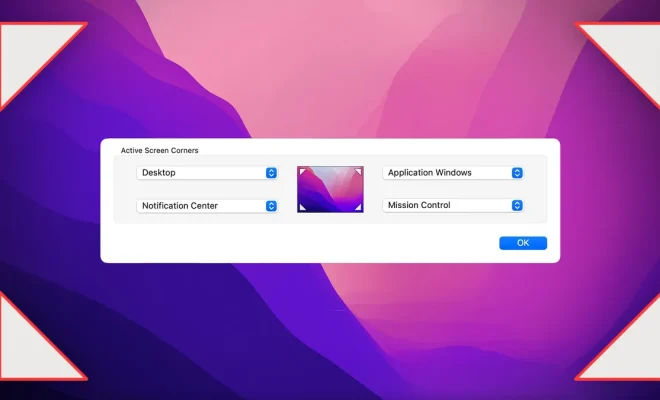
In simple terms, Hot Corners are active screen corners that trigger specific actions when you hover over them with your cursor. With this feature enabled, you can quickly execute various system functions like launching Mission Control or triggering the screensaver without needing to use keyboard shortcuts.

Why do you need Hot Corners?

Hot Corners can be incredibly useful for streamlining your workflow and improving efficiency. They provide quick access to system functions without requiring extra clicks or keyboard strokes. They enable you to:

1. Switch between apps faster: With access to Mission Control or Exposé through a Hot Corner, you can swiftly navigate between open applications.

2. Access the desktop instantly: Assigning a Hot Corner to display your desktop means you can quickly access files or make space during work sessions without minimizing windows.

3. Activate the screensaver: Set up a Hot Corner to start the screensaver if you regularly step away from your computer and want a simple way to protect your privacy.

4. Lock your Mac faster: You can assign a corner to lock the screen or put the display to sleep whenever you need added security for your device.

How to use Hot Corners:

To enable and customize Hot Corners on MacOS, follow these steps:

1. Open System Preferences: Click on the Apple menu in the top-left corner of the screen and select “System Preferences.”

2. Access Mission Control: Locate the “Mission Control” icon within System Preferences and click on it.

3. Customize Hot Corners: In the Mission Control panel, click the “Hot Corners…” button located in the bottom-left corner. A new window will appear with a drop-down menu for each corner of your display.

4. Choose desired actions for corners: Click on each corner’s drop-down menu and select an action you’d like to associate with that Hot Corner. Available options include Mission Control, Application Windows, Desktop, Dashboard, Notification Center, Launchpad, Start Screensaver, Disable Screensaver, Put Display to Sleep, and Lock Screen.

5. Save changes and test: Once you have configured your Hot Corners, click “OK” to save the changes. Test out each Hot Corner by moving your cursor over the respective corner of your screen.

Conclusion:

Hot Corners are a valuable feature of MacOS that can significantly improve your efficiency and productivity. By experimenting with different actions and settings during daily use, you will undoubtedly find configurations that best suit your unique workflow. Embrace the convenience of Hot Corners and witness its impact on your overall Mac experience.


Previous Article

Best Home Office Essentials for 2023

Next Article

How I digitized my old camcorder tapes

Matthew Lynch

Related articles More from author

  • Tech Advice

    Best Credit Cards With No Foreign Transaction Fees for 2023

    July 11, 2023
    By Matthew Lynch
  • Tech Advice

    OnePlus Pad Review

    July 20, 2023
    By Matthew Lynch
  • Tech Advice

    The Ultimate Guide to Finding Cheap Car Insurance in Lakeland, Florida

    August 19, 2023
    By Matthew Lynch
  • Tech Advice

    Denon AVR-3802 AV Receiver – 7.1 Channel Review

    July 11, 2023
    By Matthew Lynch
  • Tech Advice

    Apple Watch Series 8 Deals: Snag One for as Low as $329

    July 5, 2023
    By Matthew Lynch
  • Tech Advice

    The Best Juicers, According to Rigorous Testing

    August 8, 2023
    By Matthew Lynch

Search

Login & Registration

  • Log in
  • Entries feed
  • Comments feed
  • WordPress.org

Newsletter

Signup for The Tech Edvocate Newsletter and have the latest in EdTech news and opinion delivered to your email address!

About Us

Since technology is not going anywhere and does more good than harm, adapting is the best course of action. That is where The Tech Edvocate comes in. We plan to cover the PreK-12 and Higher Education EdTech sectors and provide our readers with the latest news and opinion on the subject. From time to time, I will invite other voices to weigh in on important issues in EdTech. We hope to provide a well-rounded, multi-faceted look at the past, present, the future of EdTech in the US and internationally.

We started this journey back in June 2016, and we plan to continue it for many more years to come. I hope that you will join us in this discussion of the past, present and future of EdTech and lend your own insight to the issues that are discussed.

Newsletter

Signup for The Tech Edvocate Newsletter and have the latest in EdTech news and opinion delivered to your email address!

Contact Us

The Tech Edvocate
910 Goddin Street
Richmond, VA 23231
(601) 630-5238
[email protected]

Copyright © 2026 Matthew Lynch. All rights reserved.