The Tech Edvocate

Top Menu

  • Advertisement
  • Apps
  • Home Page
  • Home Page Five (No Sidebar)
  • Home Page Four
  • Home Page Three
  • Home Page Two
  • Home Tech2
  • Icons [No Sidebar]
  • Left Sidbear Page
  • Lynch Educational Consulting
  • My Account
  • My Speaking Page
  • Newsletter Sign Up Confirmation
  • Newsletter Unsubscription
  • Our Brands
  • Page Example
  • Privacy Policy
  • Protected Content
  • Register
  • Request a Product Review
  • Shop
  • Shortcodes Examples
  • Signup
  • Start Here
    • Governance
    • Careers
    • Contact Us
  • Terms and Conditions
  • The Edvocate
  • The Tech Edvocate Product Guide
  • Topics
  • Write For Us
  • Advertise

Main Menu

  • Start Here
    • Our Brands
    • Governance
      • Lynch Educational Consulting, LLC.
      • Dr. Lynch’s Personal Website
      • Careers
    • Write For Us
    • The Tech Edvocate Product Guide
    • Contact Us
    • Books
    • Edupedia
    • Post a Job
    • The Edvocate Podcast
    • Terms and Conditions
    • Privacy Policy
  • Topics
    • Assistive Technology
    • Child Development Tech
    • Early Childhood & K-12 EdTech
    • EdTech Futures
    • EdTech News
    • EdTech Policy & Reform
    • EdTech Startups & Businesses
    • Higher Education EdTech
    • Online Learning & eLearning
    • Parent & Family Tech
    • Personalized Learning
    • Product Reviews
  • Advertise
  • Tech Edvocate Awards
  • The Edvocate
  • Pedagogue
  • School Ratings

logo

The Tech Edvocate

  • Start Here
    • Our Brands
    • Governance
      • Lynch Educational Consulting, LLC.
      • Dr. Lynch’s Personal Website
        • My Speaking Page
      • Careers
    • Write For Us
    • The Tech Edvocate Product Guide
    • Contact Us
    • Books
    • Edupedia
    • Post a Job
    • The Edvocate Podcast
    • Terms and Conditions
    • Privacy Policy
  • Topics
    • Assistive Technology
    • Child Development Tech
    • Early Childhood & K-12 EdTech
    • EdTech Futures
    • EdTech News
    • EdTech Policy & Reform
    • EdTech Startups & Businesses
    • Higher Education EdTech
    • Online Learning & eLearning
    • Parent & Family Tech
    • Personalized Learning
    • Product Reviews
  • Advertise
  • Tech Edvocate Awards
  • The Edvocate
  • Pedagogue
  • School Ratings
  • Explosive: The Dr. Althea Skincare Scandal Is Worse Than You Think

  • Disturbing: Your Every Move Could Be Training AI – The Urgent Truth About Smart Glasses

  • The Staggering Risk Behind Paxini’s IPO: Is This AI Bubble About to Burst?

  • Devastating Steam Malware Attack Strikes Popular Game Twice in a Year

  • This PUBG Asia Stars Cheating Scandal Just Blew Up Esports — Here’s How It Happened

  • Why the US Rejected Calls for Urgent AI Global Standards — And What It Means For You

  • This Critical AI Development Caution Could Save Us All, Say Tech Giants

  • This Controversial New UK Law Will Force Boys to Learn Respect for Women

  • California Just Ignited a Firestorm Over Student Data Privacy — Here’s Why You Should Care

  • Devastating: New Flaws Expose Check Point Management Servers to Root-Level Takeover

Digital & Mobile Technology
Home›Digital & Mobile Technology›How to Turn On a Samsung Tablet

How to Turn On a Samsung Tablet
By Matthew Lynch
June 23, 2023
0
Spread the love

Samsung tablets are one of the most popular tablets in the world today. They have become a staple in many households and businesses, and are used for a wide range of purposes, including entertainment, communication, and productivity. However, if you are new to Samsung tablets, turning them on might not be a straightforward process. This article will outline how to turn on a Samsung tablet.

Step 1: Locate the Power Button

The first thing you need to do is locate the power button on your Samsung tablet. The power button is usually located on the top or side of the tablet, depending on the model. On some models, the power button is located on the back of the tablet.

Step 2: Press and Hold the Power Button

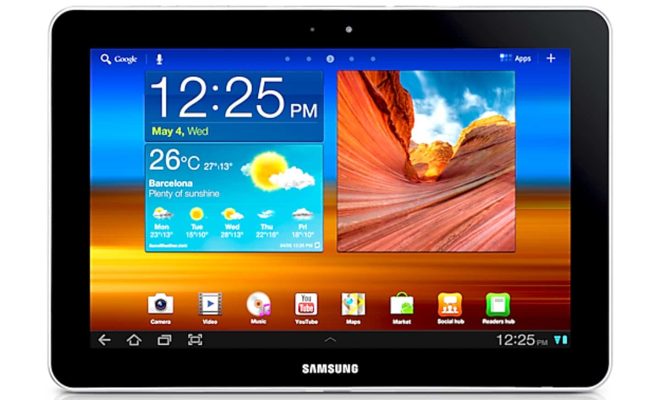
To turn on your Samsung tablet, press and hold the power button for a few seconds. You will see the Samsung logo appear on the screen, indicating that the tablet is powering up. You may also see the Android logo on some models.

Step 3: Wait for the Tablet to Boot Up

Once the Samsung logo appears, wait for the tablet to boot up. This process may take a few seconds, depending on the model and the level of battery charge. You will know that the tablet is ready for use when the home screen appears.

Step 4: Enter Your Credentials

If you have security features such as a PIN or password, you will need to enter these when prompted to unlock your Samsung tablet. Once you have entered your credentials, you will be taken to the home screen.

Step 5: Start Using Your Samsung Tablet

Your Samsung tablet is now ready for use. Depending on your model and setup, you will have the ability to browse the internet, check your email, watch videos, play games, and access a range of other apps and features.

In conclusion, turning on a Samsung tablet is a simple process that can be done by pressing and holding the power button. Follow the steps outlined in this article, and you will be able to get your Samsung tablet up and running in no time.


Previous Article

How to Define and Edit a Named ...

Next Article

How to Avoid Buffering Issues When Streaming ...

Matthew Lynch

Related articles More from author

  • Digital & Mobile Technology

    How to Take the Perfect Polaroid Picture: Tips

    June 13, 2023
    By Matthew Lynch
  • Digital & Mobile Technology

    How to Turn Your Phone’s Flashlight On and Off

    June 7, 2023
    By Matthew Lynch
  • Digital & Mobile Technology

    What Is a DDOC File?

    June 12, 2023
    By Matthew Lynch
  • Digital & Mobile Technology

    How to See Your Most Played Songs on Apple Music in 2023

    July 6, 2023
    By Matthew Lynch
  • Digital & Mobile Technology

    Causes for a Raspberry Pi That Won’t Boot (And How to Fix Them)

    June 15, 2023
    By Matthew Lynch
  • Digital & Mobile Technology

    What Is Beacon Technology?

    June 15, 2023
    By Matthew Lynch

Search

Login & Registration

  • Log in
  • Entries feed
  • Comments feed
  • WordPress.org

Newsletter

Signup for The Tech Edvocate Newsletter and have the latest in EdTech news and opinion delivered to your email address!

About Us

Since technology is not going anywhere and does more good than harm, adapting is the best course of action. That is where The Tech Edvocate comes in. We plan to cover the PreK-12 and Higher Education EdTech sectors and provide our readers with the latest news and opinion on the subject. From time to time, I will invite other voices to weigh in on important issues in EdTech. We hope to provide a well-rounded, multi-faceted look at the past, present, the future of EdTech in the US and internationally.

We started this journey back in June 2016, and we plan to continue it for many more years to come. I hope that you will join us in this discussion of the past, present and future of EdTech and lend your own insight to the issues that are discussed.

Newsletter

Signup for The Tech Edvocate Newsletter and have the latest in EdTech news and opinion delivered to your email address!

Contact Us

The Tech Edvocate
910 Goddin Street
Richmond, VA 23231
(601) 630-5238
[email protected]

Copyright © 2026 Matthew Lynch. All rights reserved.