The Tech Edvocate

Top Menu

  • Advertisement
  • Apps
  • Home Page
  • Home Page Five (No Sidebar)
  • Home Page Four
  • Home Page Three
  • Home Page Two
  • Home Tech2
  • Icons [No Sidebar]
  • Left Sidbear Page
  • Lynch Educational Consulting
  • My Account
  • My Speaking Page
  • Newsletter Sign Up Confirmation
  • Newsletter Unsubscription
  • Our Brands
  • Page Example
  • Privacy Policy
  • Protected Content
  • Register
  • Request a Product Review
  • Shop
  • Shortcodes Examples
  • Signup
  • Start Here
    • Governance
    • Careers
    • Contact Us
  • Terms and Conditions
  • The Edvocate
  • The Tech Edvocate Product Guide
  • Topics
  • Write For Us
  • Advertise

Main Menu

  • Start Here
    • Our Brands
    • Governance
      • Lynch Educational Consulting, LLC.
      • Dr. Lynch’s Personal Website
      • Careers
    • Write For Us
    • The Tech Edvocate Product Guide
    • Contact Us
    • Books
    • Edupedia
    • Post a Job
    • The Edvocate Podcast
    • Terms and Conditions
    • Privacy Policy
  • Topics
    • Assistive Technology
    • Child Development Tech
    • Early Childhood & K-12 EdTech
    • EdTech Futures
    • EdTech News
    • EdTech Policy & Reform
    • EdTech Startups & Businesses
    • Higher Education EdTech
    • Online Learning & eLearning
    • Parent & Family Tech
    • Personalized Learning
    • Product Reviews
  • Advertise
  • Tech Edvocate Awards
  • The Edvocate
  • Pedagogue
  • School Ratings

logo

The Tech Edvocate

  • Start Here
    • Our Brands
    • Governance
      • Lynch Educational Consulting, LLC.
      • Dr. Lynch’s Personal Website
        • My Speaking Page
      • Careers
    • Write For Us
    • The Tech Edvocate Product Guide
    • Contact Us
    • Books
    • Edupedia
    • Post a Job
    • The Edvocate Podcast
    • Terms and Conditions
    • Privacy Policy
  • Topics
    • Assistive Technology
    • Child Development Tech
    • Early Childhood & K-12 EdTech
    • EdTech Futures
    • EdTech News
    • EdTech Policy & Reform
    • EdTech Startups & Businesses
    • Higher Education EdTech
    • Online Learning & eLearning
    • Parent & Family Tech
    • Personalized Learning
    • Product Reviews
  • Advertise
  • Tech Edvocate Awards
  • The Edvocate
  • Pedagogue
  • School Ratings
  • How to use ClickUp goals feature

  • Trello for Business

  • Can Smartsheet do automation

  • How to use Microsoft Planner boards

  • How many transactions in Kashoo

  • Sage

  • Is Sage worth it for accountants

  • How to use Smartsheet templates

  • How many users in Zoho Books free plan

  • Can Wrike integrate with Adobe Creative Cloud

Digital & Mobile Technology
Home›Digital & Mobile Technology›iPhone Hotspot Not Working? How to Fix iPhone Tethering

iPhone Hotspot Not Working? How to Fix iPhone Tethering
By Matthew Lynch
June 22, 2023
0
Spread the love

In today’s digital world, having access to the internet is a necessity. Whether it’s for work or staying connected with loved ones, we rely heavily on our devices to keep us connected to the online world.

One way to access the internet on the go is through tethering, where you can use your iPhone as a hotspot to connect to the internet on other devices. However, like any technology, it can experience hiccups and malfunctions, leaving you unable to connect. If you’re experiencing an iPhone hotspot not working, here’s how to fix it.
Check Your Cellular Plan

Before trying any troubleshooting methods, it’s essential to ensure that your current cellular plan allows for hotspot capabilities. Some plans may limit or restrict the ability to tether, so it’s important to double-check with your carrier.

Restart Your iPhone

One of the simplest fixes for any device issue is to restart it. Turn off your iPhone and turn it back on after a few seconds. This can help reset any glitches that may have caused the hotspot not to work.

Check Your iPhone Settings

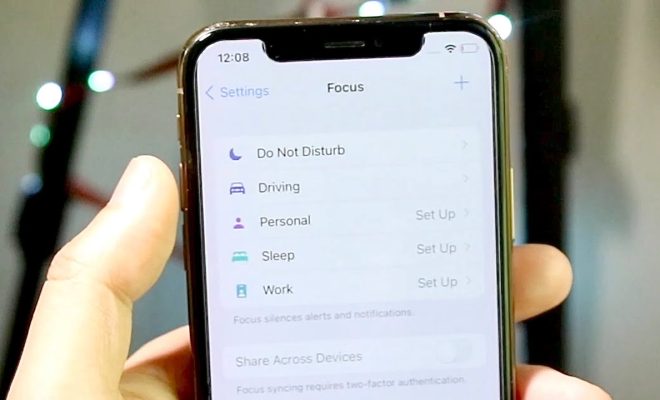
If restarting doesn’t work, ensure that tethering is enabled in your iPhone’s settings.

To check if it’s enabled, go to “Settings,” then “Personal Hotspot” and check if it’s turned on. If it’s turned on, toggle it off and on again to reset.

Also, make sure that your device has enough data to support the connected device. If you’ve reached your data limit, tethering may not work.

Update Your iPhone

Outdated software may cause issues with tethering. Check if any updates are available and install them. This can resolve any software-related issues that may have caused the hotspot not to work.

Reset Your Network Settings

If the hotspot still isn’t working, resetting your network settings may help. This will remove any saved WiFi networks, Bluetooth devices, and other network-related settings.

To reset your network settings, go to “Settings,” then “General,” then “Reset,” and select “Reset Network Settings”. After it’s done, restart your iPhone and check if the hotspot is working.

Check for any Carrier Settings Updates

Your carrier may release carrier settings updates that can address compatibility issues with tethering. These updates can help resolve any potential network-related or carrier-specific issues.

To ensure your iPhone has the latest carrier settings, go to “Settings,” then “General,” then “About,” and if an update is available, a prompt will appear.

Contact Your Carrier

If none of the above troubleshooting techniques work, it’s time to contact your carrier for further assistance. The issue might be larger, and they’ll be able to assist in resolving any network-based problems that can cause the hotspot not to work.


Previous Article

Is Microsoft Word Crashing on Windows? Here’s ...

Next Article

What Is a DNS Server and Why ...

Matthew Lynch

Related articles More from author

  • Digital & Mobile Technology

    How to Use Open-Shell in Windows 11

    June 23, 2023
    By Matthew Lynch
  • Digital & Mobile Technology

    Will a Car Power Inverter Drain the Battery?

    July 4, 2023
    By Matthew Lynch
  • Digital & Mobile Technology

    How to Rotate a Video in VLC (And Save It)

    May 5, 2023
    By Matthew Lynch
  • Digital & Mobile Technology

    How Your Instagram Account Can Be Hacked and How To Stop It

    June 23, 2023
    By Matthew Lynch
  • Digital & Mobile Technology

    What Is a DCR File?

    June 9, 2023
    By Matthew Lynch
  • Digital & Mobile Technology

    Zip Bombs: What They Are and How to Protect Yourself

    June 15, 2023
    By Matthew Lynch

Search

Login & Registration

  • Log in
  • Entries feed
  • Comments feed
  • WordPress.org

Newsletter

Signup for The Tech Edvocate Newsletter and have the latest in EdTech news and opinion delivered to your email address!

About Us

Since technology is not going anywhere and does more good than harm, adapting is the best course of action. That is where The Tech Edvocate comes in. We plan to cover the PreK-12 and Higher Education EdTech sectors and provide our readers with the latest news and opinion on the subject. From time to time, I will invite other voices to weigh in on important issues in EdTech. We hope to provide a well-rounded, multi-faceted look at the past, present, the future of EdTech in the US and internationally.

We started this journey back in June 2016, and we plan to continue it for many more years to come. I hope that you will join us in this discussion of the past, present and future of EdTech and lend your own insight to the issues that are discussed.

Newsletter

Signup for The Tech Edvocate Newsletter and have the latest in EdTech news and opinion delivered to your email address!

Contact Us

The Tech Edvocate
910 Goddin Street
Richmond, VA 23231
(601) 630-5238
[email protected]

Copyright © 2026 Matthew Lynch. All rights reserved.